5.CSharp调用Lua-Lua管理器
5.1 知识点
创建Lua管理器,实现单例和一些常用方法。目的是保证Lua解析器唯一。同时封装了执行lua脚本方法和大G表属性
public class LuaManager : BaseSingletonInCSharp<LuaManager>
{
    private LuaEnv luaEnv;

    /// <summary>
    /// 初始化解析器
    /// </summary>
    public void Init()
    {
        //已经初始化了 别初始化 直接返回
        if (luaEnv != null)
            return;
        //初始化
        luaEnv = new LuaEnv();
        //加载lua脚本 重定向
        luaEnv.AddLoader(MyCustomLoader);
    }

    //自定义加载路径
    private byte[] MyCustomLoader(ref string filePath)
    {
        //通过函数中的逻辑 去加载 Lua文件

        //参数filePath 是 require执行的 lua脚本文件名 比如上面执行的Main
        //我们需要拼接 lua 脚本所在路径,例如统一放在 Assets 下的 LuaScripts 文件夹下
        //注意要把lua脚本文件名和.lua后缀也加上 因为不在Resources下 不需要.txt后缀了
        string path = Application.dataPath + "/LuaScripts/" + filePath + ".lua";
        Debug.Log(path);

        //判断lua脚本文件名所在的路径是否存在
        if (File.Exists(path))
        {
            //存在的话 从 所在的路径的lua脚本中 读取二进制数据 并将其以字节数组的形式返回
            return File.ReadAllBytes(path);
        }
        else
        {
            //不存在则读取失败
            Debug.Log("MyCustomLoader重定向失败,文件名为" + filePath);
        }

        return null;
    }

    /// <summary>
    /// 传入lua文件名 执行lua脚本
    /// </summary>
    /// <param name="fileName"></param>
    public void DoLuaFile(string fileName)
    {
        string str = string.Format("require('{0}')", fileName);
        DoString(str);
    }

    /// <summary>
    /// 执行Lua语言
    /// </summary>
    /// <param name="str"></param>
    public void DoString(string str)
    {
        if (luaEnv == null)
        {
            Debug.Log("解析器未初始化");
            return;
        }
        luaEnv.DoString(str);
    }

    /// <summary>
    /// 释放lua 垃圾
    /// </summary>
    public void Tick()
    {
        if (luaEnv == null)
        {
            Debug.Log("解析器未初始化");
            return;
        }
        luaEnv.Tick();
    }

    /// <summary>
    /// 销毁解析器
    /// </summary>
    public void Dispose()
    {
        if (luaEnv == null)
        {
            Debug.Log("解析器未初始化");
            return;
        }
        try
        {
            luaEnv.Dispose();
            luaEnv = null;
            Debug.Log("释放成功");
        }
        catch (System.Exception ex)
        {
            Debug.Log(ex.Message);
        }

    }
}
给Lua脚本打成AB包
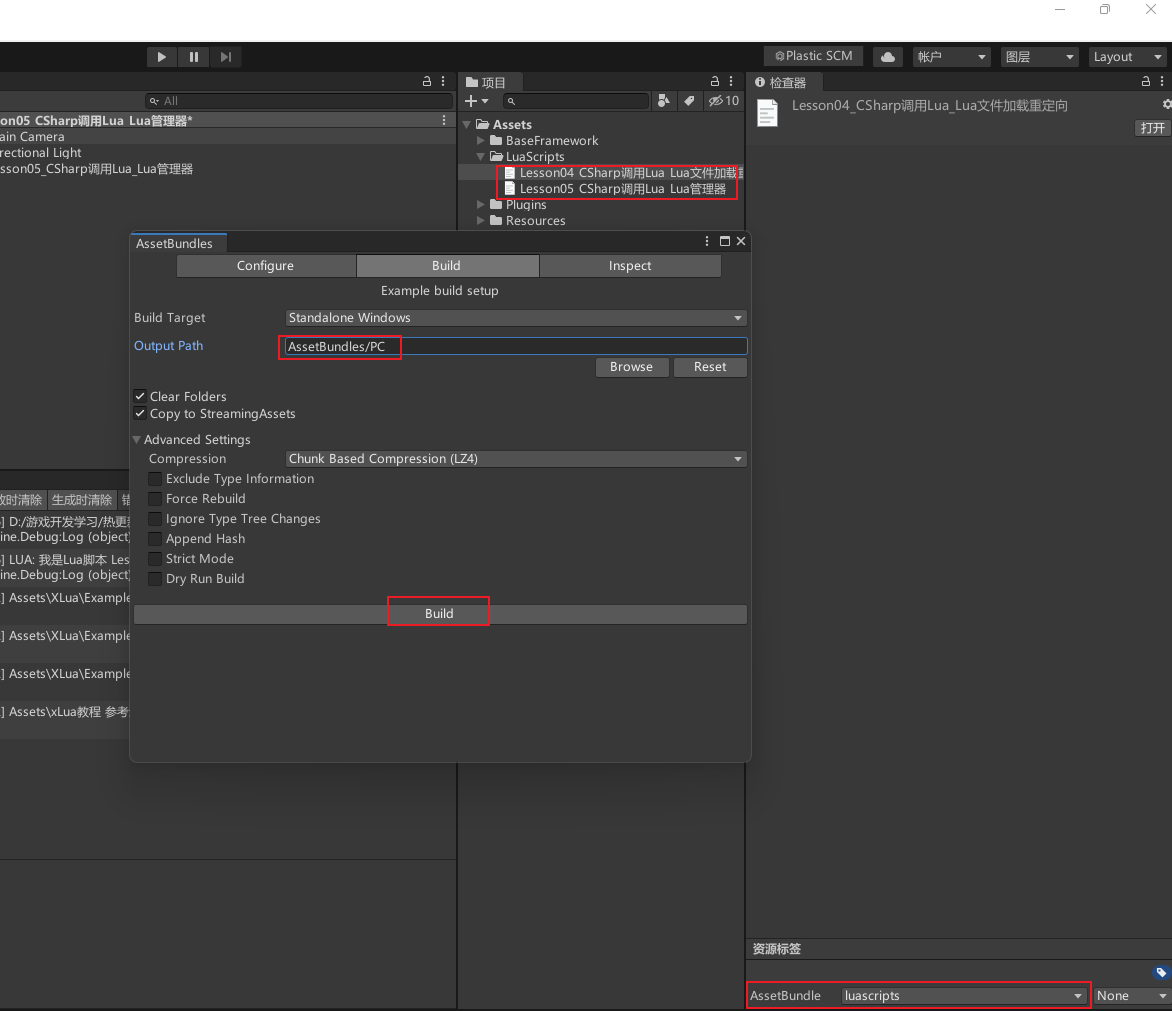
注意暂时要把lua脚本改成.txt后缀,才能打包成功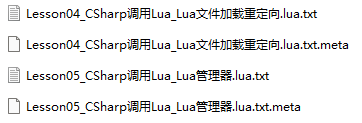
假如出现报错就清空代码后再打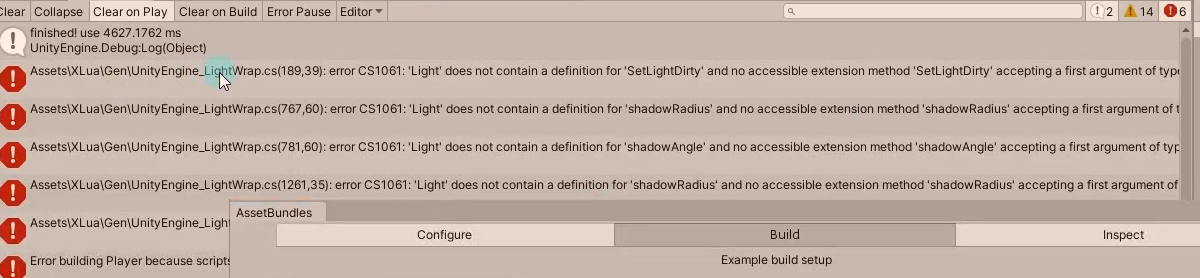
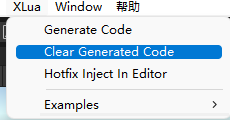
打包成功后记得右键刷新,可能才能在StreamingAssets文件夹刷出来
执行AB包中的Lua脚本
在Lua管理器中添加重定向到AB包路径的方法
/// <summary>
/// 初始化解析器
/// </summary>
public void Init()
{
    //已经初始化了 别初始化 直接返回
    if (luaEnv != null)
        return;
    //初始化
    luaEnv = new LuaEnv();
    //加载lua脚本 重定向
    luaEnv.AddLoader(MyCustomLoader);//先找指定的LuaScripts文件夹有没有这个脚本
    luaEnv.AddLoader(MyCustomAssetBundleLoader);//再找AB包中有没有
}

//Lua脚本会放在AB包 Lua脚本打成AB包的时候加了.txt后缀
//最终我们会通过加载AB包再加载其中的Lua脚本资源 来执行它
//重定向加载AB包中的Lua脚本
private byte[] MyCustomAssetBundleLoader(ref string filePath)
{
    Debug.Log("进入AB包加载 重定向函数");


    // //假如没有AB包管理器 要自己手动写加载AB包代码
    // //从AB包中加载lua文件
    // //拼出AB包路径
    // string path = Application.streamingAssetsPath + "/luascripts";
    // //加载AB包
    // AssetBundle assetBundle = AssetBundle.LoadFromFile(path);
    // //加载Lua文件 因为打成AB包的时候加了.txt后缀 所以加载类型是TextAsset 加上.lua后缀
    // TextAsset luaTextAsset = assetBundle.LoadAsset<TextAsset>(filePath + ".lua");


    //通过我们的AB包管理器 加载的lua脚本资源
    TextAsset luaTextAsset = AssetBundleManager.Instance.LoadAssetBundleResource<TextAsset>("luascripts", filePath + ".lua");
    //加载成功把Lua文件转成byte数组并返回 不成功返回空打印报空信息


    //把Lua文件转成byte数组并返回
    if (luaTextAsset != null)
        return luaTextAsset.bytes;
    else
        Debug.Log("MyCustomAssetBundleLoader重定向失败,文件名为:" + filePath);
    return null;
}
在测试脚本中执行文件
print('我是Lua脚本 Lesson05_CSharp调用Lua_Lua管理器')
public class Lesson05_CSharp调用Lua_Lua管理器 : MonoBehaviour
{
    void Start()
    {
        LuaManager.Instance.Init();

        //LuaManager.Instance.DoString("require('Lesson05_CSharp调用Lua_Lua管理器')");

        LuaManager.Instance.DoLuaFile("Lesson05_CSharp调用Lua_Lua管理器");
    }

}
注意事项
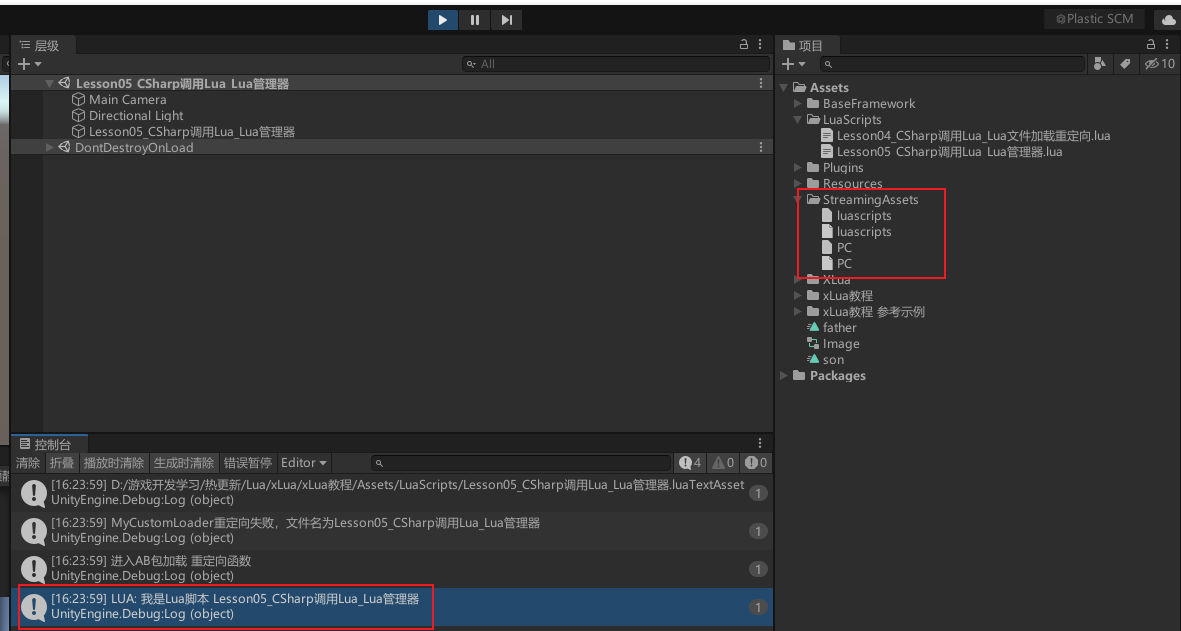
- 由于LuaScripts文件夹下的lua脚本后缀被改成.txt,所以不能重定向到LuaScripts文件夹下,会重定向到AB包中。
实际开发中的处理
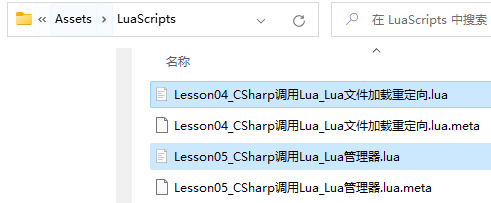
- 实际开发中不会在lua脚本后加.txt后缀,只有测试热更新功能是否正常或最终打包才会,之后会做一个工具,可以一键修改lua脚本后缀.txt,和一键还原后缀为.lua。现在先把文件夹后缀改回.lua
Lua脚本是否加.txt总结
在Resources下要加.txt,自定义加载路径中不用加,打成AB包的时候要加.txt。
5.2 知识点代码
Lesson05_CSharp调用Lua_Lua管理器.lua
print('我是Lua脚本 Lesson05_CSharp调用Lua_Lua管理器')
LuaManager
using System.Collections;
using System.Collections.Generic;
using System.IO;
using UnityEngine;
using XLua;

public class LuaManager : BaseSingletonInCSharp<LuaManager>
{
    //执行Lua语言的函数
    //释放垃圾
    //销毁
    //重定向
    private LuaEnv luaEnv;


    /// <summary>
    /// 得到Lua中的_G
    /// </summary>
    public LuaTable Global
    {
        get
        {
            return luaEnv.Global;
        }
    }


    /// <summary>
    /// 初始化解析器
    /// </summary>
    public void Init()
    {
        //已经初始化了 别初始化 直接返回
        if (luaEnv != null)
            return;
        //初始化
        luaEnv = new LuaEnv();
        //加载lua脚本 重定向
        luaEnv.AddLoader(MyCustomLoader);//先找指定的LuaScripts文件夹有没有这个脚本
        luaEnv.AddLoader(MyCustomAssetBundleLoader);//再找AB包中有没有
    }

    //自定义加载路径
    private byte[] MyCustomLoader(ref string filePath)
    {
        //通过函数中的逻辑 去加载 Lua文件
        Debug.Log("进入自定义加载 重定向函数");
        //参数filePath 是 require执行的 lua脚本文件名 比如上面执行的Main
        //我们需要拼接 lua 脚本所在路径,例如统一放在 Assets 下的 LuaScripts 文件夹下
        //注意要把lua脚本文件名和.lua后缀也加上 因为不在Resources下 不需要.txt后缀了
        string path = Application.dataPath + "/LuaScripts/" + filePath + ".lua";
        Debug.Log(path);

        //判断lua脚本文件名所在的路径是否存在
        if (File.Exists(path))
        {
            //存在的话 从 所在的路径的lua脚本中 读取二进制数据 并将其以字节数组的形式返回
            return File.ReadAllBytes(path);
        }
        else
        {
            //不存在则读取失败
            Debug.Log("MyCustomLoader重定向失败,文件名为" + filePath);
        }


        return null;
    }


    //Lua脚本会放在AB包 Lua脚本打成AB包的时候加了.txt后缀
    //最终我们会通过加载AB包再加载其中的Lua脚本资源 来执行它
    //重定向加载AB包中的Lua脚本
    private byte[] MyCustomAssetBundleLoader(ref string filePath)
    {
        Debug.Log("进入AB包加载 重定向函数");


        // //假如没有AB包管理器 要自己手动写加载AB包代码
        // //从AB包中加载lua文件
        // //拼出AB包路径
        // string path = Application.streamingAssetsPath + "/luascripts";
        // //加载AB包
        // AssetBundle assetBundle = AssetBundle.LoadFromFile(path);
        // //加载Lua文件 因为打成AB包的时候加了.txt后缀 所以加载类型是TextAsset 加上.lua后缀
        // TextAsset luaTextAsset = assetBundle.LoadAsset<TextAsset>(filePath + ".lua");


        //通过我们的AB包管理器 加载的lua脚本资源
        TextAsset luaTextAsset = AssetBundleManager.Instance.LoadAssetBundleResource<TextAsset>("luascripts", filePath + ".lua");
        //加载成功把Lua文件转成byte数组并返回 不成功返回空打印报空信息


        //把Lua文件转成byte数组并返回
        if (luaTextAsset != null)
            return luaTextAsset.bytes;
        else
            Debug.Log("MyCustomAssetBundleLoader重定向失败,文件名为:" + filePath);
        return null;
    }


    /// <summary>
    /// 传入lua文件名 执行lua脚本
    /// </summary>
    /// <param name="fileName"></param>
    public void DoLuaFile(string fileName)
    {
        string str = string.Format("require('{0}')", fileName);
        DoString(str);
    }

    /// <summary>
    /// 执行Lua语言
    /// </summary>
    /// <param name="str"></param>
    public void DoString(string str)
    {
        if (luaEnv == null)
        {
            Debug.Log("解析器未初始化");
            return;
        }
        luaEnv.DoString(str);
    }

    /// <summary>
    /// 释放lua 垃圾
    /// </summary>
    public void Tick()
    {
        if (luaEnv == null)
        {
            Debug.Log("解析器未初始化");
            return;
        }
        luaEnv.Tick();
    }

    /// <summary>
    /// 销毁解析器
    /// </summary>
    public void Dispose()
    {
        if (luaEnv == null)
        {
            Debug.Log("解析器未初始化");
            return;
        }
        try
        {
            luaEnv.Dispose();
            luaEnv = null;
            Debug.Log("释放成功");
        }
        catch (System.Exception ex)
        {
            Debug.Log(ex.Message);
        }

    }
}
Lesson05_CSharp调用Lua_Lua管理器
using System.Collections;
using System.Collections.Generic;
using UnityEngine;

public class Lesson05_CSharp调用Lua_Lua管理器 : MonoBehaviour
{
    void Start()
    {
        LuaManager.Instance.Init();

        //LuaManager.Instance.DoString("require('Lesson05_CSharp调用Lua_Lua管理器')");

        LuaManager.Instance.DoLuaFile("Lesson05_CSharp调用Lua_Lua管理器");
    }

}
转载请注明来源,欢迎对文章中的引用来源进行考证,欢迎指出任何有错误或不够清晰的表达。可以在下面评论区评论,也可以邮件至 785293209@qq.com