1.必备知识点-编辑模式下让指定代码运行
1.1 知识点
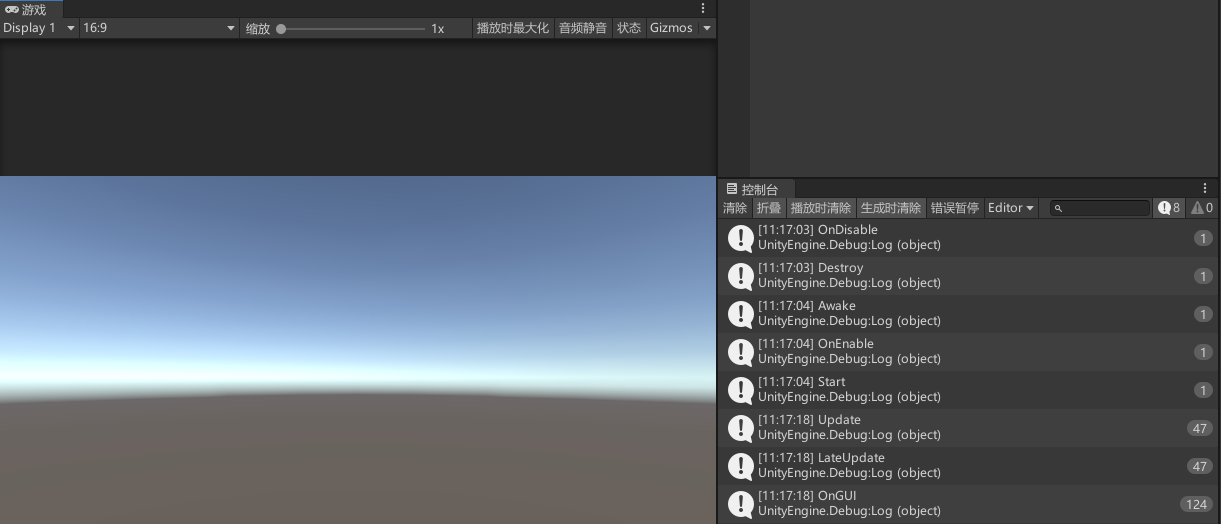
在类名上添加 [ExecuteAlways] 特性可以让指定代码在编辑模式下运行
编辑模式下调整 Game 视口大小等操作时,与帧相关的生命周期与回调(例如 Update、OnGUI)仍会按帧执行,便于在编辑态调试或绘制 IMGUI。
// 在类上添加 ExecuteAlways,可在编辑模式下也跑 MonoBehaviour 的生命周期与回调
[ExecuteAlways]
public class Lesson01_必备知识点_编辑模式下让指定代码运行 : MonoBehaviour
{
    private void Awake()
    {
        Debug.Log("Awake");
    }

    private void OnEnable()
    {
        Debug.Log("OnEnable");
    }

    void Start()
    {
        Debug.Log("Start");
    }

    private void FixedUpdate()
    {
        Debug.Log("FixedUpdate");
    }

    void Update()
    {
        Debug.Log("Update");
    }

    private void LateUpdate()
    {
        Debug.Log("LateUpdate");
    }

    private void OnGUI()
    {
        Debug.Log("OnGUI");
    }

    private void OnDisable()
    {
        Debug.Log("OnDisable");
    }

    private void OnDestroy()
    {
        Debug.Log("OnDestroy");
    }
}
1.2 知识点代码
using System.Collections;
using System.Collections.Generic;
using UnityEngine;

// 在类上添加 ExecuteAlways,可在编辑模式下也跑 MonoBehaviour 的生命周期与回调
[ExecuteAlways]
public class Lesson01_必备知识点_编辑模式下让指定代码运行 : MonoBehaviour
{
    private void Awake()
    {
        Debug.Log("Awake");
    }

    private void OnEnable()
    {
        Debug.Log("OnEnable");
    }

    void Start()
    {
        Debug.Log("Start");
    }

    private void FixedUpdate()
    {
        Debug.Log("FixedUpdate");
    }

    void Update()
    {
        Debug.Log("Update");
    }

    private void LateUpdate()
    {
        Debug.Log("LateUpdate");
    }

    private void OnGUI()
    {
        Debug.Log("OnGUI");
    }

    private void OnDisable()
    {
        Debug.Log("OnDisable");
    }

    private void OnDestroy()
    {
        Debug.Log("OnDestroy");
    }
}
转载请注明来源,欢迎对文章中的引用来源进行考证,欢迎指出任何有错误或不够清晰的表达。可以在下面评论区评论,也可以邮件至 785293209@qq.com