31.性能优化-CPU-脚本-组件获取
31.1 知识点
用最快方式获取组件
Unity 中获取组件主要通过 GetComponent 方法,常见重载有三种:
GetComponent(Type type)— 通过类型的Type获取,返回Component,需配合as转成具体类型。GetComponent\<T\>()— 通过泛型获取,直接返回T,写法简洁且速度最快。GetComponent(string type)— 通过字符串(类型名)获取,返回Component,需配合as,且速度最慢。
在日常开发中,若要获取组件,应优先选用泛型方式 GetComponent<T>(),在大量调用时能明显减少开销。
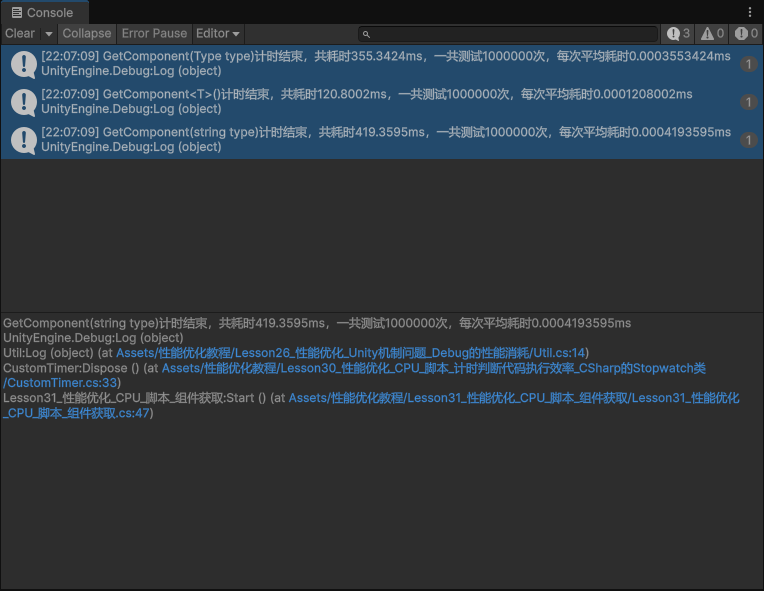
示例:用 CustomTimer 对同一组件类型做 100 万次获取,对比三种方式(仅作参考,具体数值随环境不同会有差异)。
uint testCount = 1000000;

// 方式一:GetComponent(Type)
using (new CustomTimer("GetComponent(Type type)", testCount))
{
    for (int i = 0; i < testCount; i++)
    {
        lesson31 = this.GetComponent(typeof(Lesson31_性能优化_CPU_脚本_组件获取)) as Lesson31_性能优化_CPU_脚本_组件获取;
    }
}

// 方式二:GetComponent<T>()(推荐,最快)
using (new CustomTimer("GetComponent<T>()", testCount))
{
    for (int i = 0; i < testCount; i++)
    {
        lesson31 = this.GetComponent<Lesson31_性能优化_CPU_脚本_组件获取>();
    }
}

// 方式三:GetComponent(string)
using (new CustomTimer("GetComponent(string type)", testCount))
{
    for (int i = 0; i < testCount; i++)
    {
        lesson31 = this.GetComponent("Lesson31_性能优化_CPU_脚本_组件获取") as Lesson31_性能优化_CPU_脚本_组件获取;
    }
}
控制台输出会类似:泛型方式总耗时明显小于 Type 和 string 方式,说明优先使用 GetComponent<T>() 能带来性能提升。
对频繁调用的组件应缓存组件引用
在 Unity 中反复对同一对象调用 GetComponent 是一种常见错误。即便使用最快的泛型方式,单次调用仍有一定消耗,在 Update 或高频逻辑里积少成多,开销会很明显。
因此,对常用组件应缓存引用:在 Awake、Start 或首次使用时获取一次,存到字段中,后续直接使用该字段,不再重复 GetComponent。这样既能减少 CPU 消耗,也能让代码更清晰。
31.2 知识点代码
Lesson31_性能优化_CPU_脚本_组件获取.cs
using UnityEngine;

public class Lesson31_性能优化_CPU_脚本_组件获取 : MonoBehaviour
{
    // 缓存的本脚本组件引用(避免重复 GetComponent)
    Lesson31_性能优化_CPU_脚本_组件获取 lesson31;

    void Start()
    {
        #region 知识点一 用最快方式获取组件

        /*
         * GetComponent 三种重载:GetComponent(Type)、GetComponent<T>()、GetComponent(string)。
         * 日常开发应选用速度最快的泛型方式 GetComponent<T>()。
         */
        uint testCount = 1000000;

        using (new CustomTimer("GetComponent(Type type)", testCount))
        {
            for (int i = 0; i < testCount; i++)
            {
                lesson31 = this.GetComponent(typeof(Lesson31_性能优化_CPU_脚本_组件获取)) as Lesson31_性能优化_CPU_脚本_组件获取;
            }
        }

        using (new CustomTimer("GetComponent<T>()", testCount))
        {
            for (int i = 0; i < testCount; i++)
            {
                lesson31 = this.GetComponent<Lesson31_性能优化_CPU_脚本_组件获取>();
            }
        }

        using (new CustomTimer("GetComponent(string type)", testCount))
        {
            for (int i = 0; i < testCount; i++)
            {
                lesson31 = this.GetComponent("Lesson31_性能优化_CPU_脚本_组件获取") as Lesson31_性能优化_CPU_脚本_组件获取;
            }
        }

        #endregion

        #region 知识点二 对频繁调用的组件应缓存组件引用

        /*
         * 反复 GetComponent 是常见错误;即使泛型最快仍有消耗。
         * 应将常用组件在 Awake/Start 或首次使用时获取并缓存到字段,后续直接使用字段。
         */

        #endregion
    }
}
转载请注明来源,欢迎对文章中的引用来源进行考证,欢迎指出任何有错误或不够清晰的表达。可以在下面评论区评论,也可以邮件至 785293209@qq.com