3.变换
3.1 概述
变换(Transformation)用于描述物体、相机或坐标在空间中的变化。
核心思路是把几何变换和矩阵运算联系起来,最终用统一的矩阵形式描述物体在空间中的变化。
3.2 为什么要学习变换
变换主要有两类用途:
- 建模(Modeling):通过平移、旋转、缩放等操作改变物体的位置、姿态和大小。
- 观察(Viewing):描述相机和投影过程,把三维世界转换为二维图像。
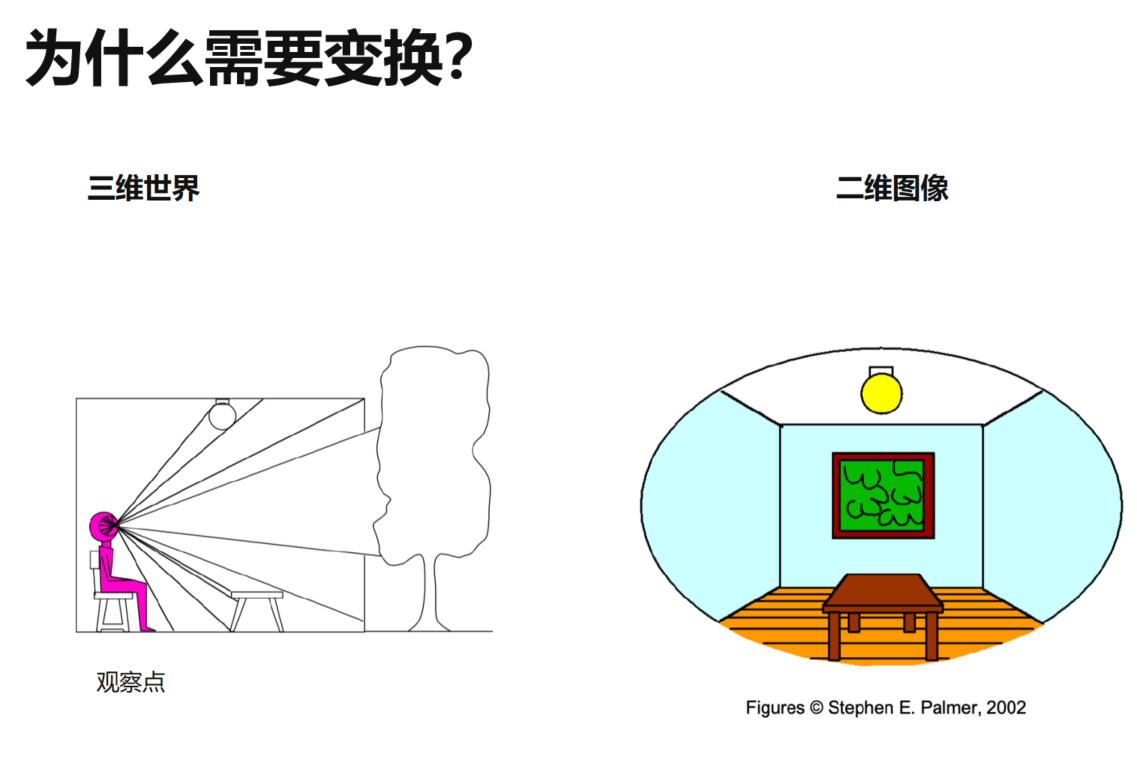
从三维世界到二维图像的过程称为投影(Projection),也是后续观察变换的重要基础。
3.3 二维变换
缩放(Scale)
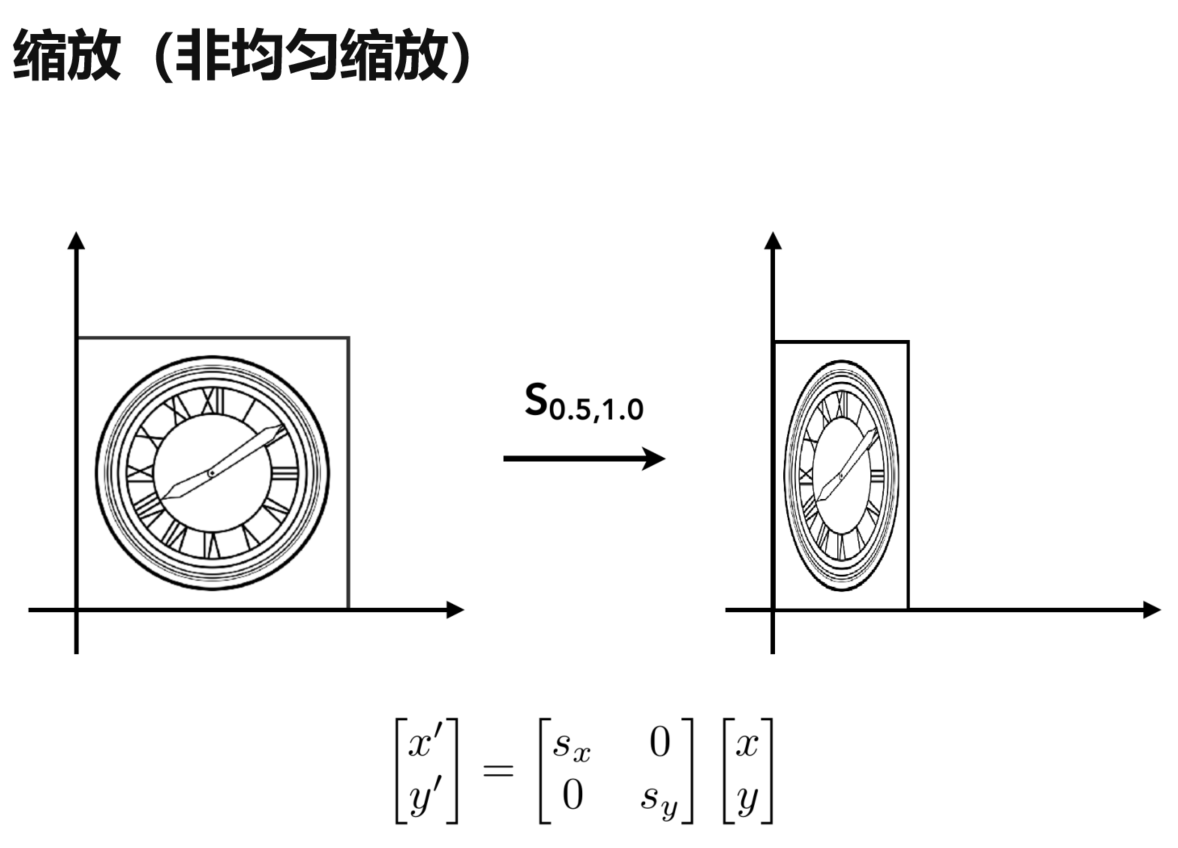
二维点 \((x,y)\) 分别沿 \(x\)、\(y\) 方向缩放 \(s_x\)、\(s_y\) 后:
\[
\begin{pmatrix}
x^{\prime}\\
y^{\prime}
\end{pmatrix} =
\begin{pmatrix}
s_x&0\\
0&s_y
\end{pmatrix}
\begin{pmatrix}
x\\
y
\end{pmatrix}
\]
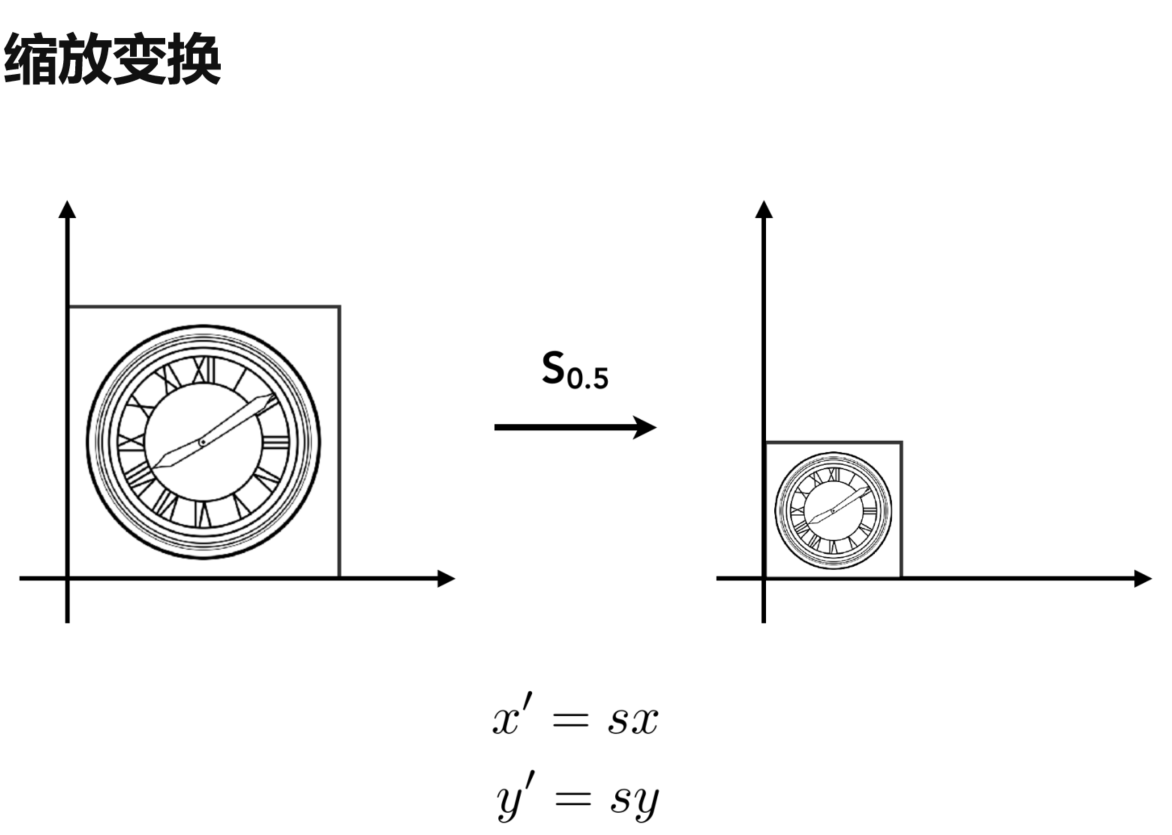
当 \(s_x=s_y\) 时是均匀缩放(Uniform Scale);两者不同时是非均匀缩放(Non-Uniform Scale)。
反射(Reflection)
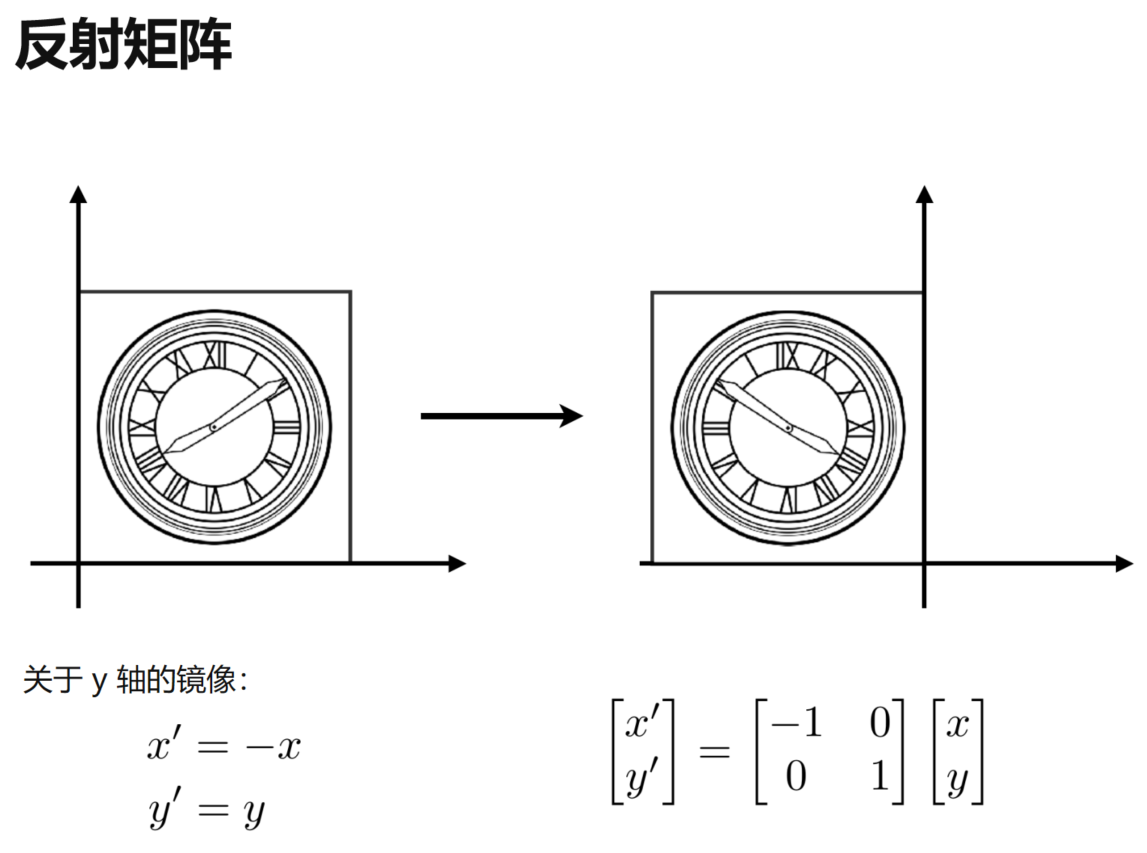
例如关于 \(y\) 轴镜像,只改变 \(x\) 坐标的符号:
\[
\begin{pmatrix}
x^{\prime}\\
y^{\prime}
\end{pmatrix} =
\begin{pmatrix}
-1&0\\
0&1
\end{pmatrix}
\begin{pmatrix}
x\\
y
\end{pmatrix}
\]
剪切(Shear)
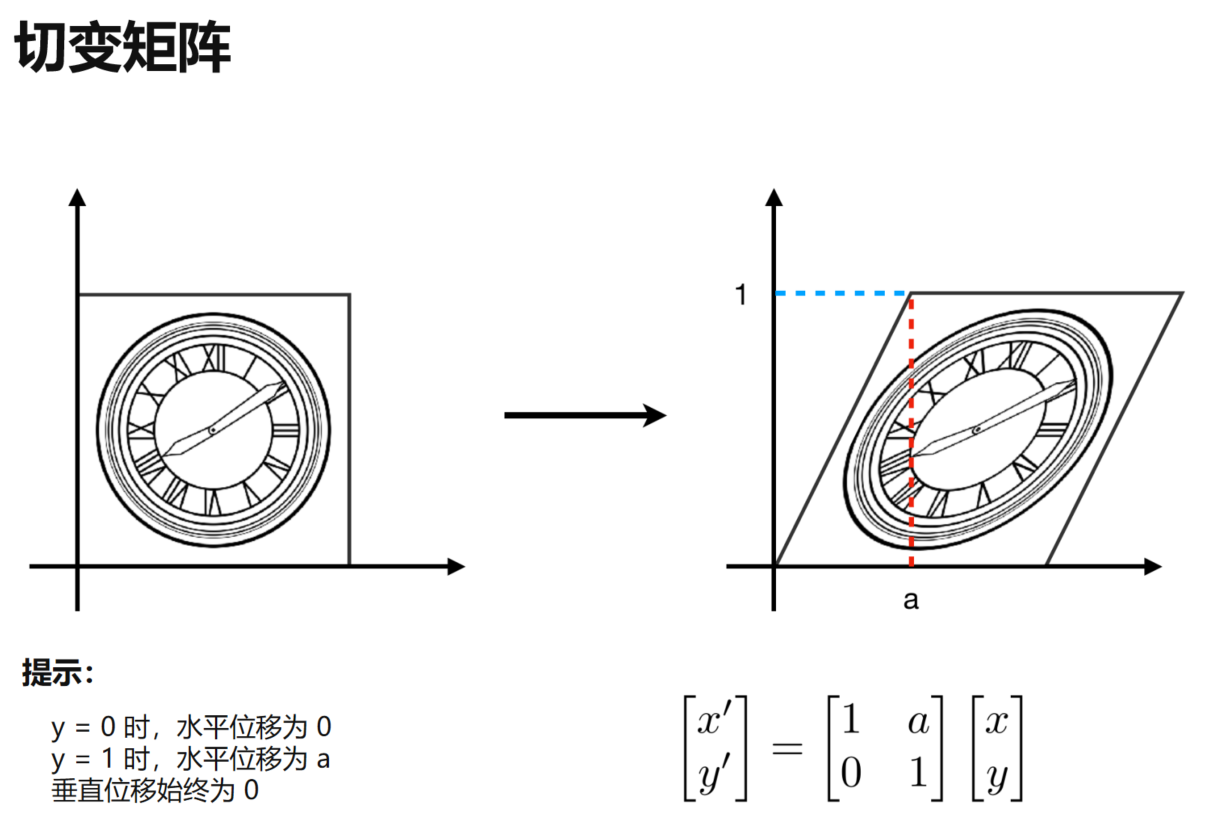
图中的水平剪切保持 \(y\) 不变,\(x\) 的偏移量随 \(y\) 增大:
\[
x’=x+ay,\qquad y’=y
\]
因此矩阵为:
\[
\begin{pmatrix}
x^{\prime}\\
y^{\prime}
\end{pmatrix} =
\begin{pmatrix}
1&a\\
0&1
\end{pmatrix}
\begin{pmatrix}
x\\
y
\end{pmatrix}
\]
旋转(Rotation)
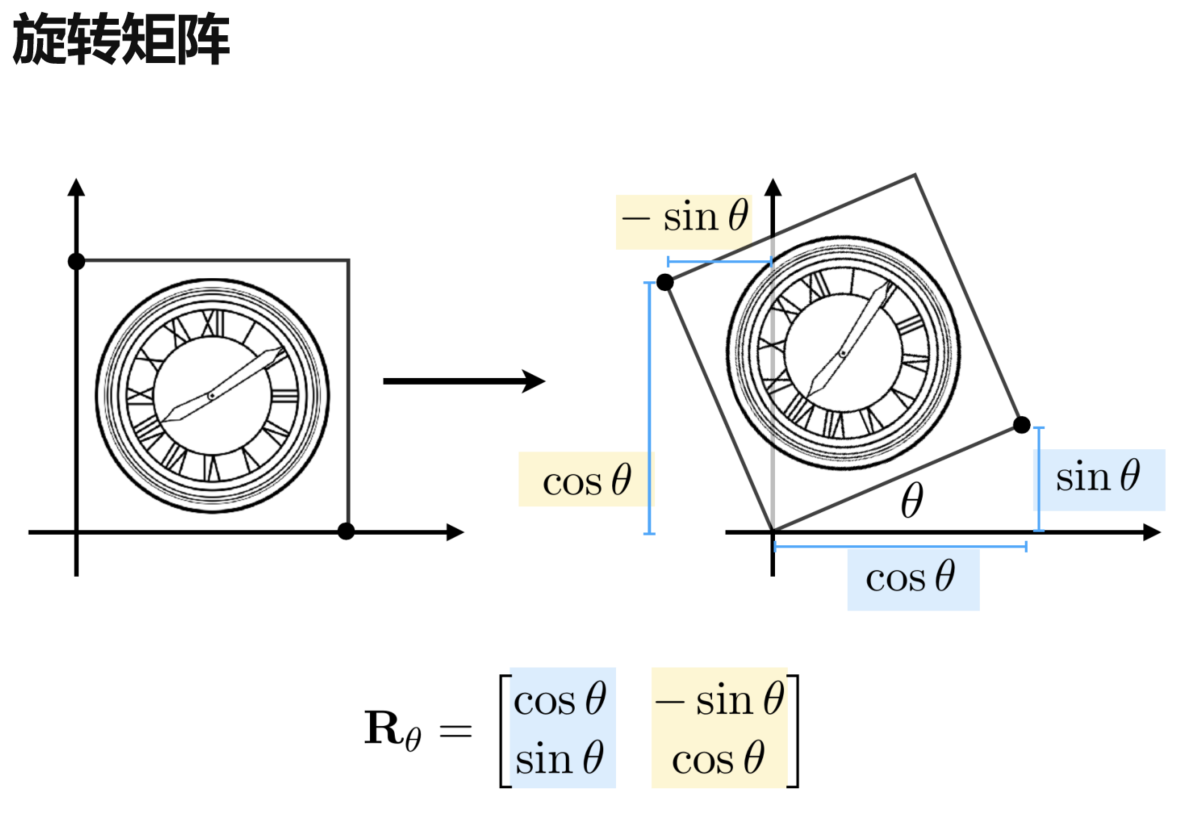
默认讨论绕原点逆时针旋转 \(\theta\):
设旋转矩阵为:
\[
R(\theta)=
\begin{pmatrix}
A&B\\
C&D
\end{pmatrix}
\]
旋转矩阵不需要死记,可以直接从两个二维基向量推出来。
先看 \(x\) 轴方向的单位向量:
\[
\begin{pmatrix}
1\\
0
\end{pmatrix}
\]
逆时针旋转 \(\theta\) 后,向量长度仍然为 \(1\),根据三角函数关系,它的新坐标为:
\[
\begin{pmatrix}
\cos\theta\\
\sin\theta
\end{pmatrix}
\]
另一方面:
\[
\begin{pmatrix}
A&B\\
C&D
\end{pmatrix}
\begin{pmatrix}
1\\
0
\end{pmatrix} =
\begin{pmatrix}
A\\
C
\end{pmatrix}
\]
因此:
\[
A=\cos\theta,\qquad C=\sin\theta
\]
也就是说,旋转矩阵的第一列,就是 \((1,0)^T\) 旋转后的结果。
再看 \(y\) 轴方向的单位向量:
\[
\begin{pmatrix}
0\\
1
\end{pmatrix}
\]
逆时针旋转 \(\theta\) 后,其方向相当于 \(\frac{\pi}{2}+\theta\),因此:
\[
\begin{pmatrix}
\cos(\frac{\pi}{2}+\theta)\\
\sin(\frac{\pi}{2}+\theta)
\end{pmatrix} =
\begin{pmatrix}
-\sin\theta\\
\cos\theta
\end{pmatrix}
\]
同时:
\[
\begin{pmatrix}
A&B\\
C&D
\end{pmatrix}
\begin{pmatrix}
0\\
1
\end{pmatrix} =
\begin{pmatrix}
B\\
D
\end{pmatrix}
\]
所以:
\[
B=-\sin\theta,\qquad D=\cos\theta
\]
最终得到二维旋转矩阵:
\[
R(\theta)=
\begin{pmatrix}
\cos\theta&-\sin\theta\\
\sin\theta&\cos\theta
\end{pmatrix}
\]
核心就是看两个基向量旋转后去了哪里,它们的结果分别组成旋转矩阵的第一列和第二列。
线性变换(Linear Transformation)
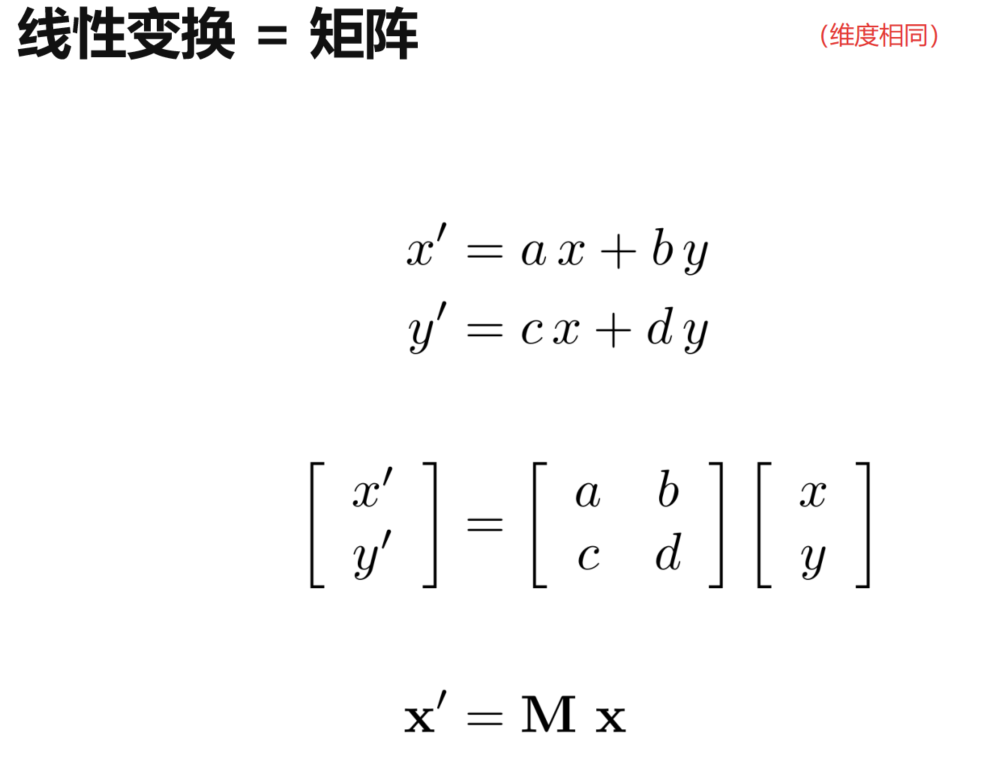
缩放、反射、剪切和旋转都可以统一写成:
\[
\begin{pmatrix}
x^{\prime}\\
y^{\prime}
\end{pmatrix} =
\begin{pmatrix}
a&b\\
c&d
\end{pmatrix}
\begin{pmatrix}
x\\
y
\end{pmatrix}
\]
即:
\[
\mathbf{x}’=M\mathbf{x}
\]
能够写成同维矩阵乘向量形式的这些变换,都属于线性变换。
3.4 齐次坐标(Homogeneous Coordinates)
为什么需要齐次坐标
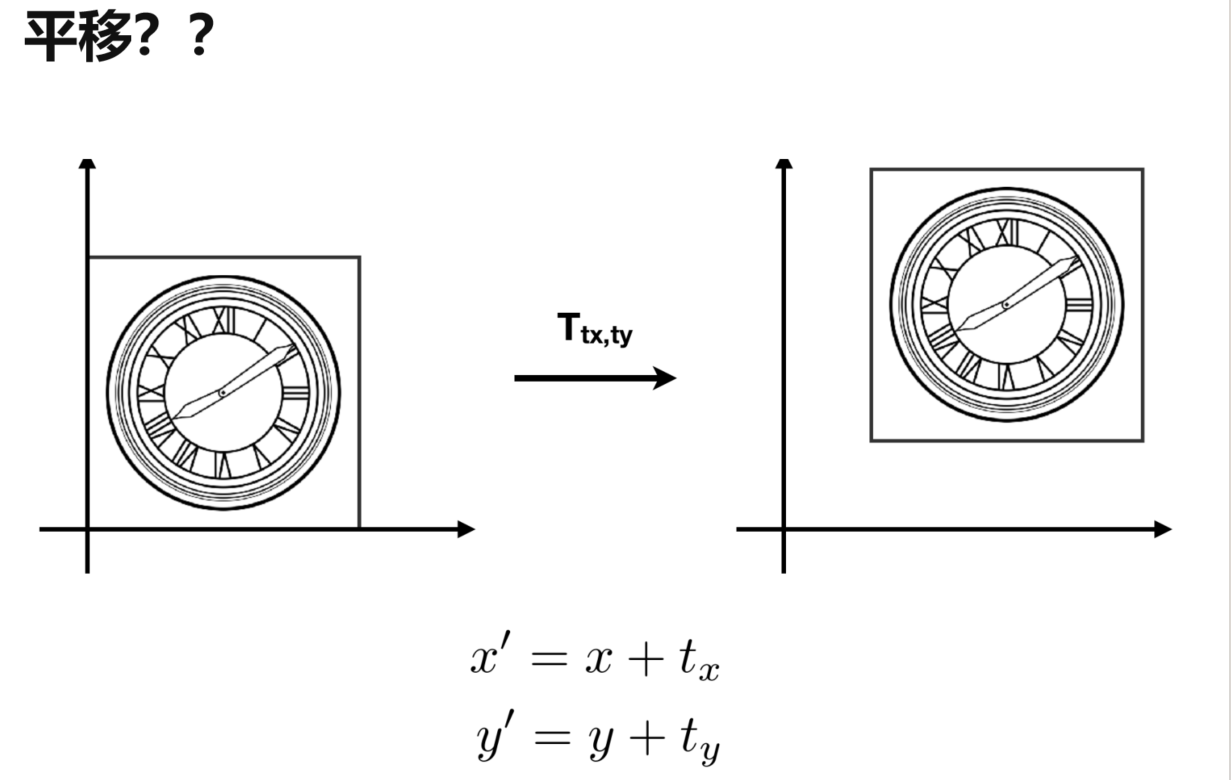
平移和前面的线性变换不同:
\[
x’=x+t_x,\qquad y’=y+t_y
\]
这里多出了常量 \(t_x\)、\(t_y\),无法仅使用普通的 \(2\times2\) 矩阵乘法表示。
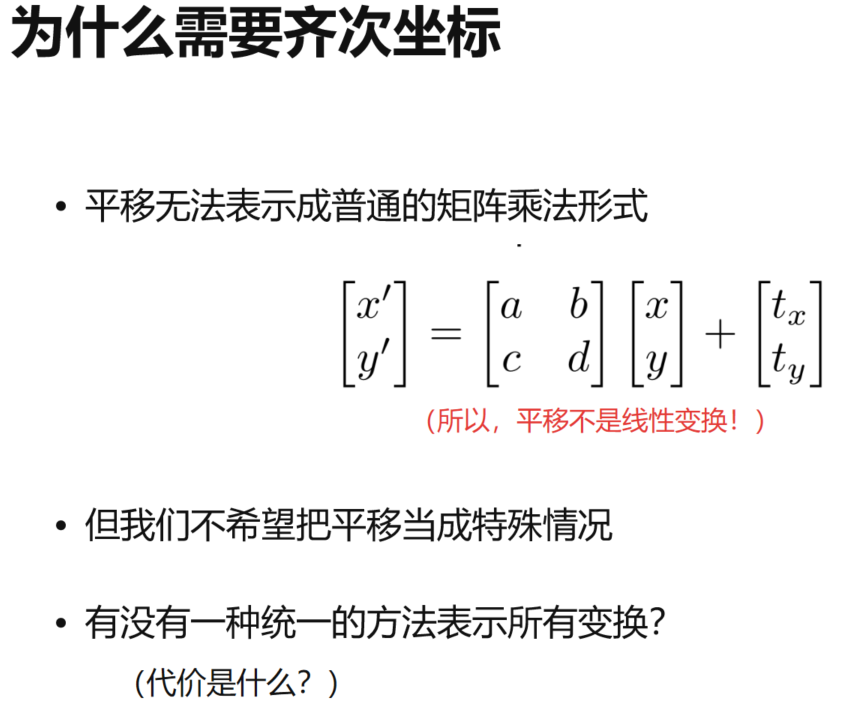
也就是说,平移不是二维空间中的线性变换。为了把平移也统一成矩阵乘法,引入齐次坐标。
点与向量的齐次表示
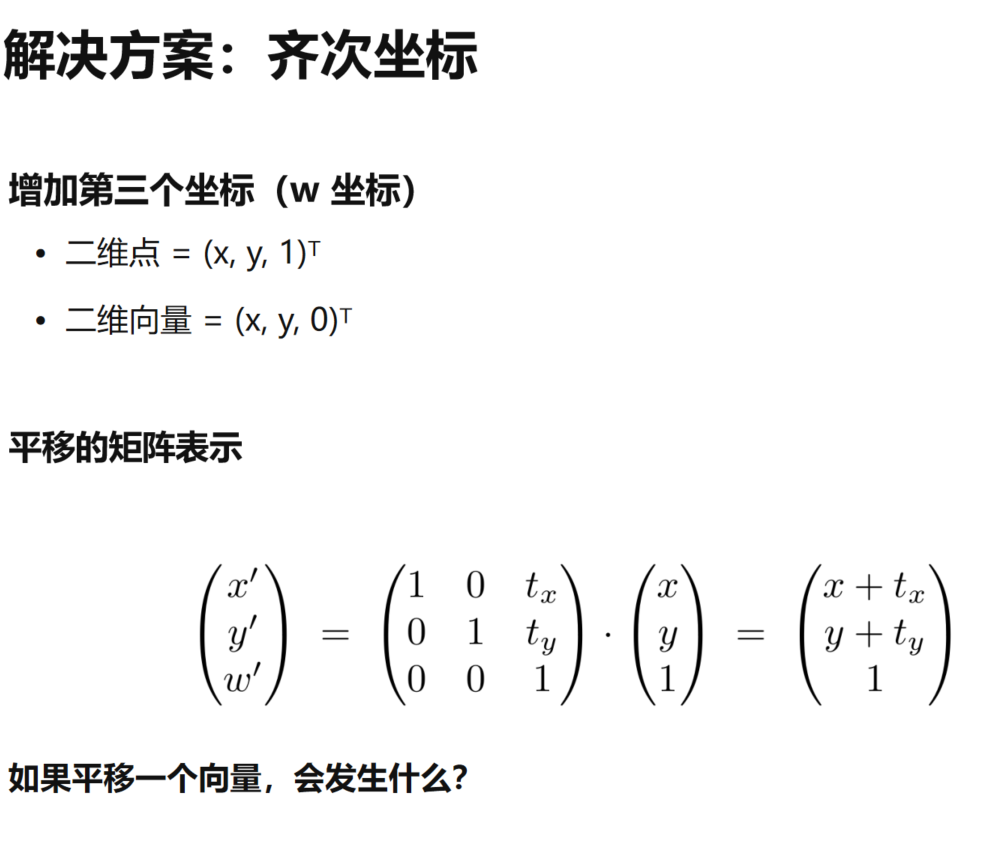
二维坐标增加一个 \(w\) 分量:
- 点(Point):\((x,y,1)^T\)
- 向量(Vector):\((x,y,0)^T\)
于是平移可以写成:
\[
\begin{pmatrix}
x^{\prime}\\
y^{\prime}\\
1
\end{pmatrix} =
\begin{pmatrix}
1&0&t_x\\
0&1&t_y\\
0&0&1
\end{pmatrix}
\begin{pmatrix}
x\\
y\\
1
\end{pmatrix} =
\begin{pmatrix}
x+t_x\\
y+t_y\\
1
\end{pmatrix}
\]
对于二维向量 \(\vec v=(v_x,v_y)^T\),齐次坐标表示为:
\[
\begin{pmatrix}
v_x\\
v_y\\
0
\end{pmatrix}
\]
使用同一个平移矩阵:
\[
\begin{pmatrix}
v_x^{\prime}\\
v_y^{\prime}\\
0
\end{pmatrix} =
\begin{pmatrix}
1&0&t_x\\
0&1&t_y\\
0&0&1
\end{pmatrix}
\begin{pmatrix}
v_x\\
v_y\\
0
\end{pmatrix} =
\begin{pmatrix}
v_x\\
v_y\\
0
\end{pmatrix}
\]
因为:
\[
v_x’=v_x+t_x\cdot0=v_x
\]
\[
v_y’=v_y+t_y\cdot0=v_y
\]
所以,平移不会改变向量。
向量的 \(w=0\),因此平移矩阵不会改变向量。这也符合向量只有方向和长度,没有绝对位置的含义。
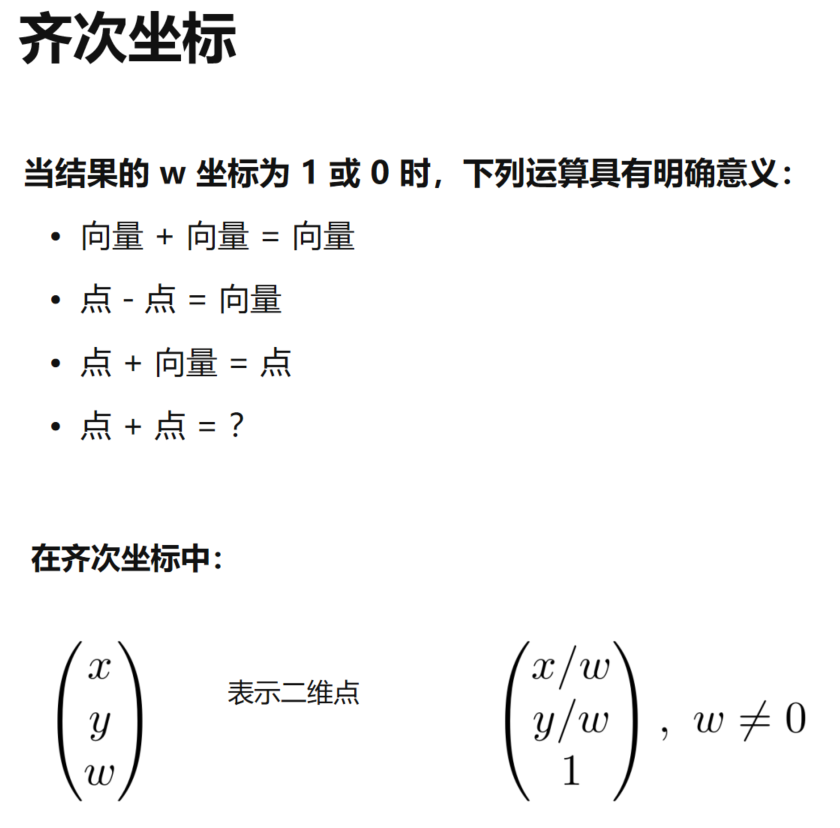
齐次坐标下:
- 向量 + 向量 = 向量
- 点 - 点 = 向量
- 点 + 向量 = 点
对于 \((x,y,w)^T\),只要 \(w\neq0\),都可以整体除以 \(w\),规范化为:
\[
\begin{pmatrix}
x/w\\
y/w\\
1
\end{pmatrix}
\]
两个点直接相加会得到 \(w=2\),重新归一化后对应两个点的中点。
仿射变换(Affine Transformation)
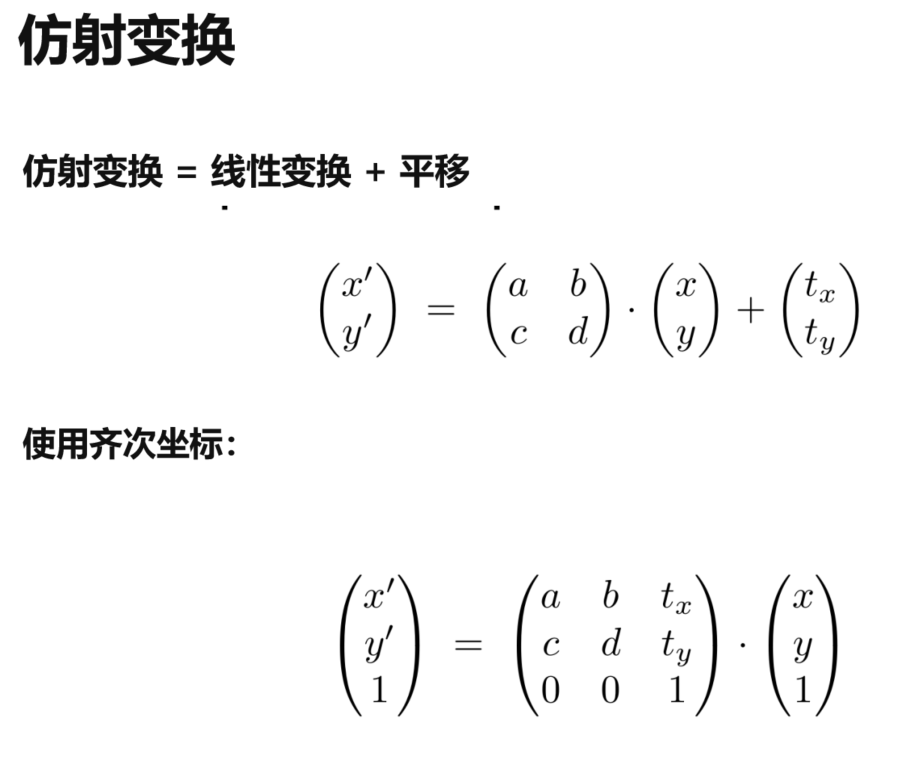
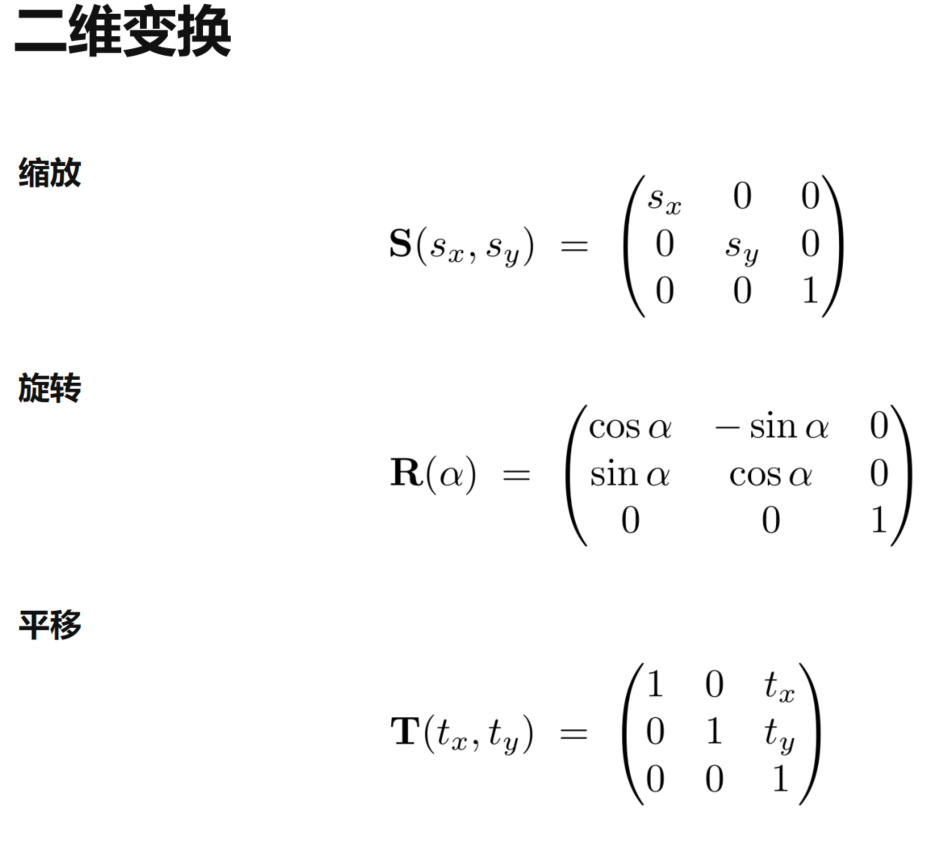
仿射变换 = 线性变换 + 平移。
二维仿射变换统一写成:
\[
\begin{pmatrix}
x^{\prime}\\
y^{\prime}\\
1
\end{pmatrix} =
\begin{pmatrix}
a&b&t_x\\
c&d&t_y\\
0&0&1
\end{pmatrix}
\begin{pmatrix}
x\\
y\\
1
\end{pmatrix}
\]
左上角的 \(2\times2\) 部分描述线性变换,最后一列描述平移。
逆变换(Inverse Transform)
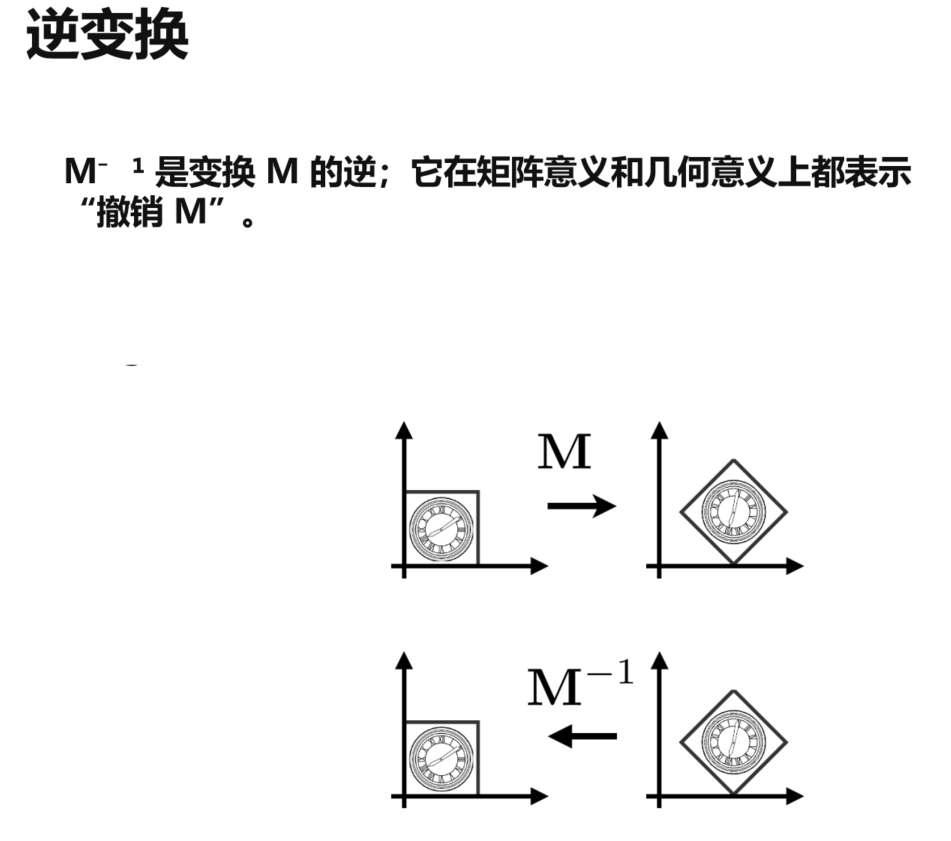
如果矩阵 \(M\) 表示一个可逆变换,那么 \(M^{-1}\) 表示它的逆变换:
\[
M^{-1}M=I
\]
几何意义很直接:先做 \(M\),再做 \(M^{-1}\),物体会回到原来的状态。
3.5 组合变换(Composing Transforms)
变换顺序
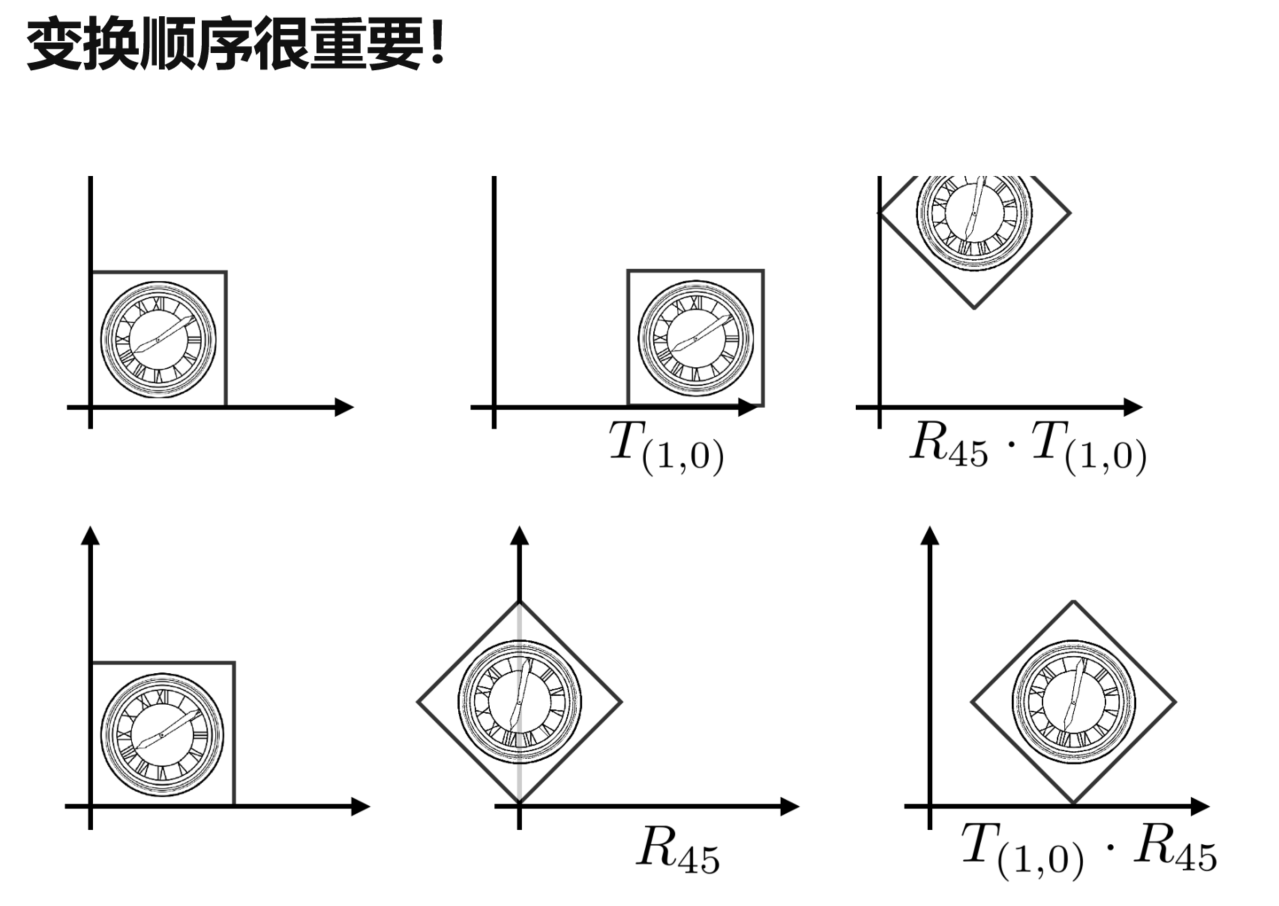
多个简单变换可以组合成复杂变换,但顺序不能随意交换。
例如先旋转再平移,与先平移再旋转,最终结果通常不同:
\[
R\,T\neq T\,R
\]
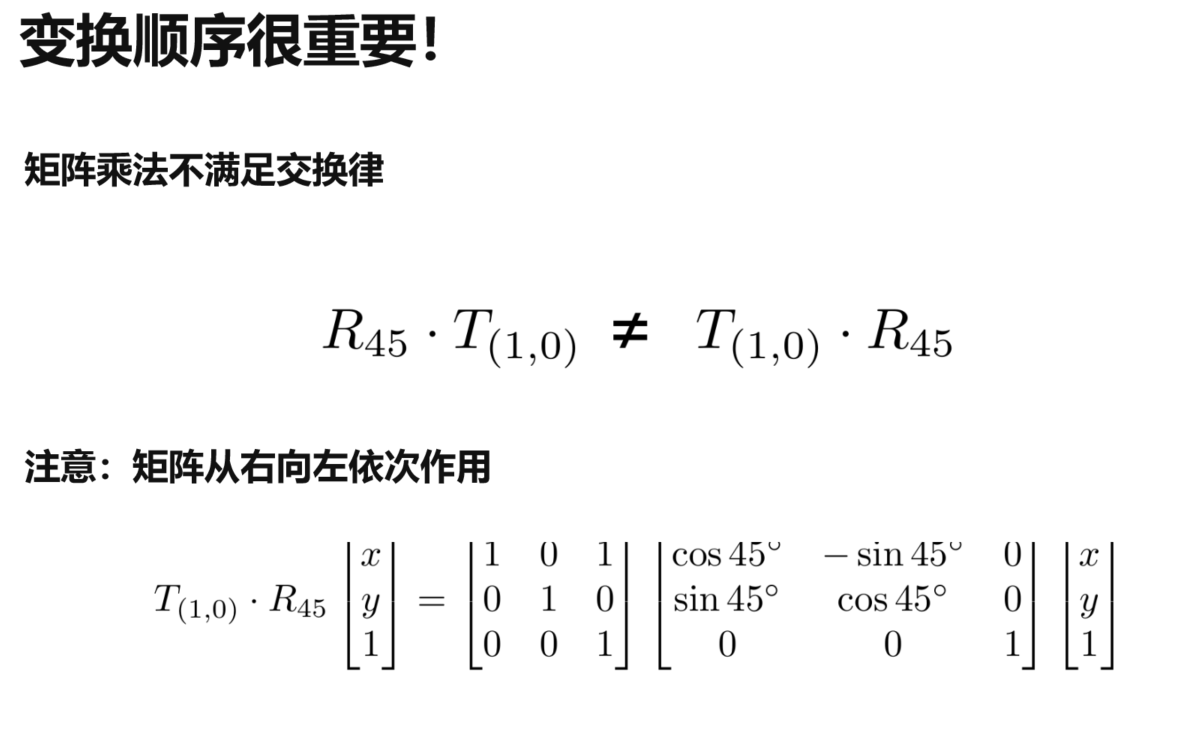
使用列向量并把矩阵乘在左侧时,矩阵按从右到左的顺序作用。
例如:
\[
\mathbf{p}’=T_{(1,0)}R_{45^\circ}\mathbf{p}
\]
表示先对 \(\mathbf p\) 旋转 \(45^\circ\),再沿 \(x\) 方向平移一个单位。
组合多个变换
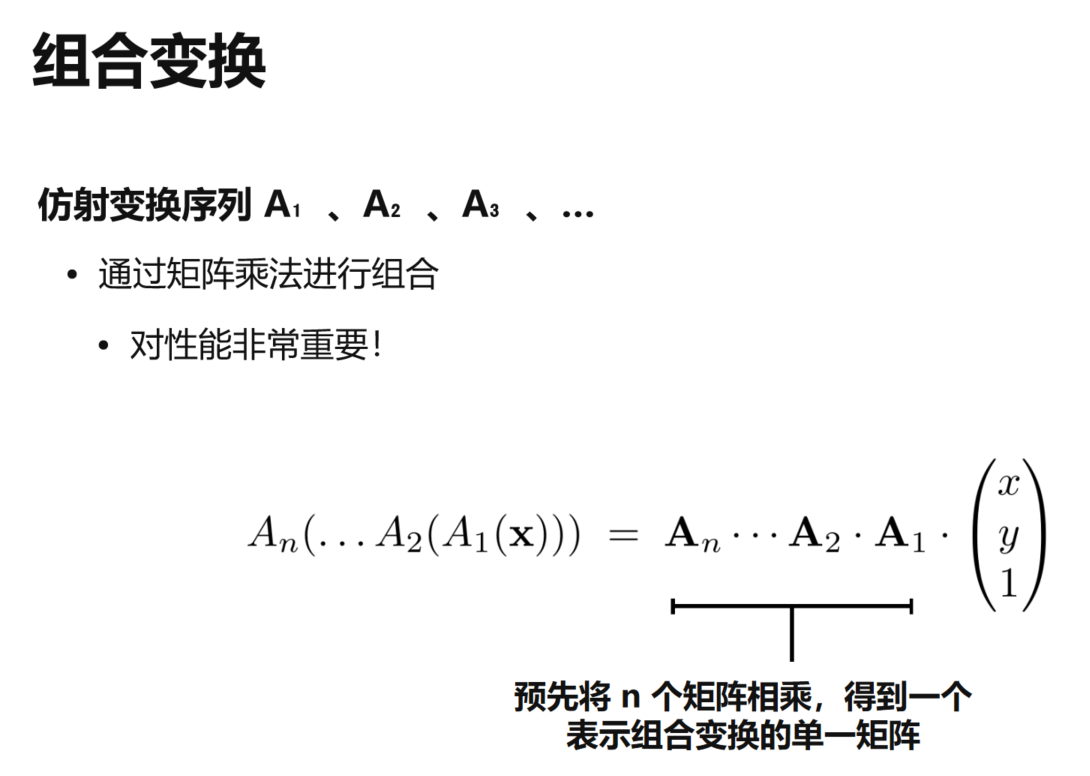
连续进行 \(A_1,A_2,\cdots,A_n\):
\[
\mathbf{p}’=A_n\cdots A_2A_1\mathbf{p}
\]
矩阵乘法满足结合律,因此可以先把多个变换矩阵相乘,得到一个组合矩阵,再用于后续计算。
复杂的变换分解
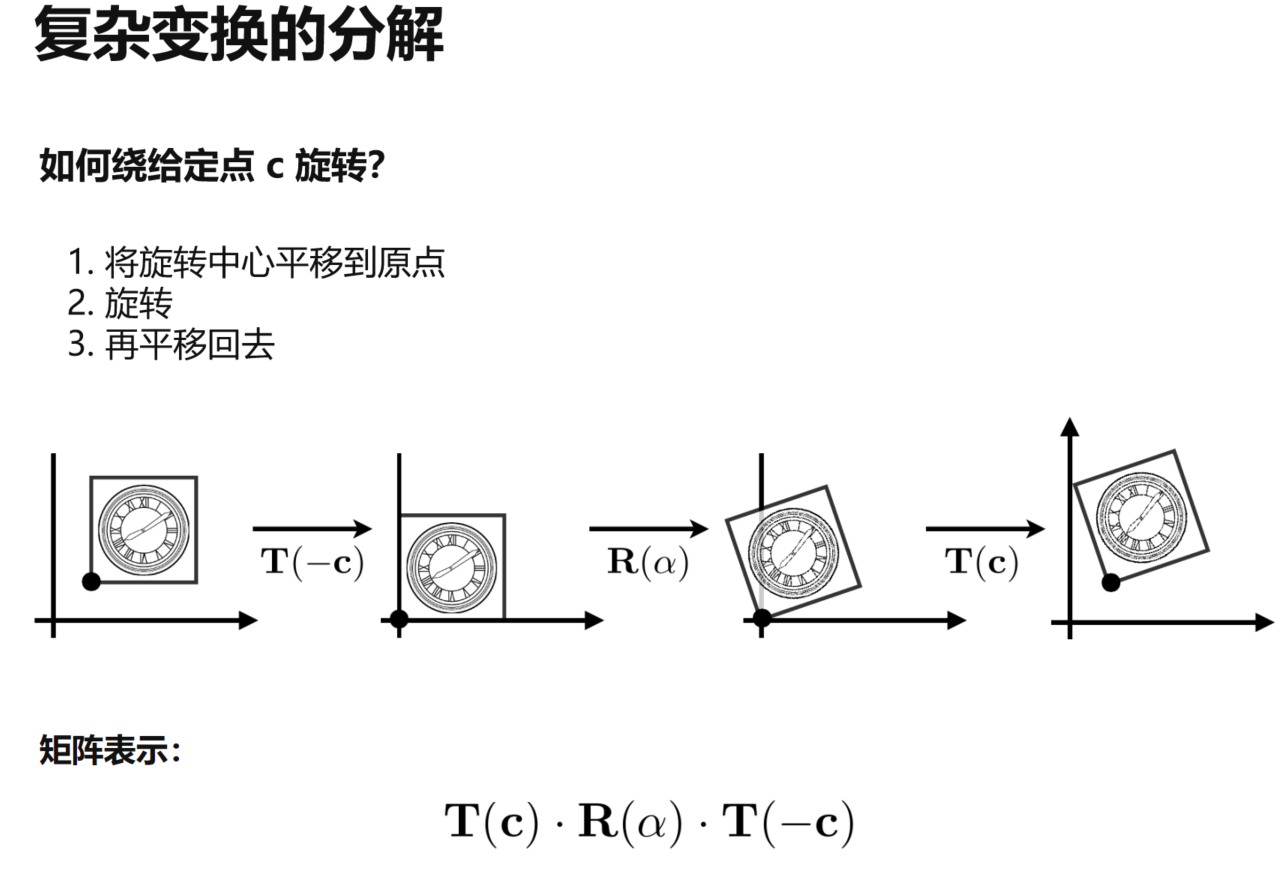
比如我们想绕任意点 \(\mathbf c\) 旋转,可以拆成三步:
- 将 \(\mathbf c\) 平移到原点。
- 绕原点旋转。
- 平移回原位置。
矩阵形式为:
\[
T(\mathbf c)\,R(\theta)\,T(-\mathbf c)
\]
最右边的 \(T(-\mathbf c)\) 最先执行。
3.6 三维变换
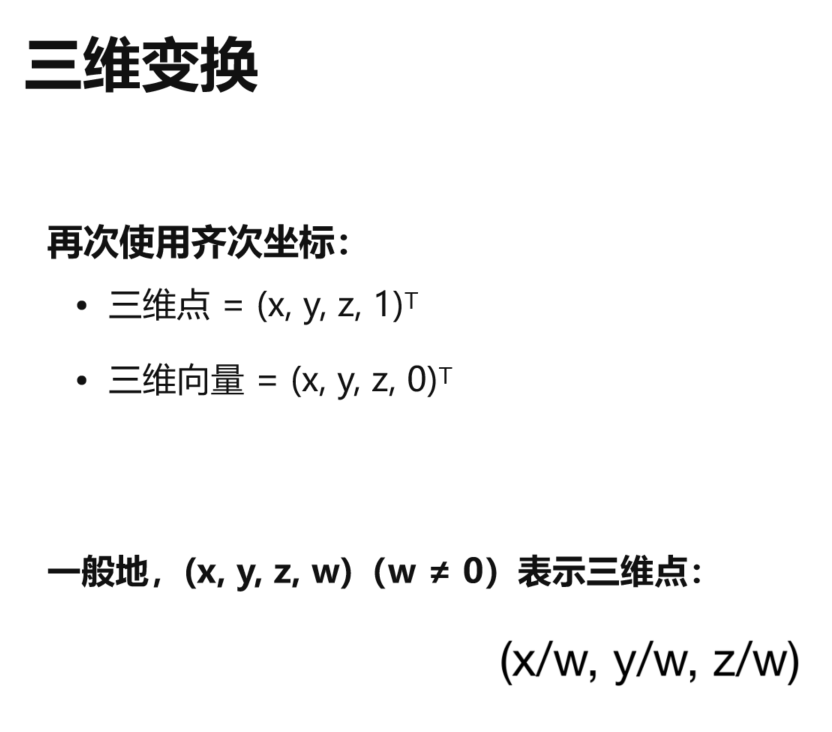
二维齐次坐标可以直接推广到三维:
- 三维点:\((x,y,z,1)^T\)
- 三维向量:\((x,y,z,0)^T\)
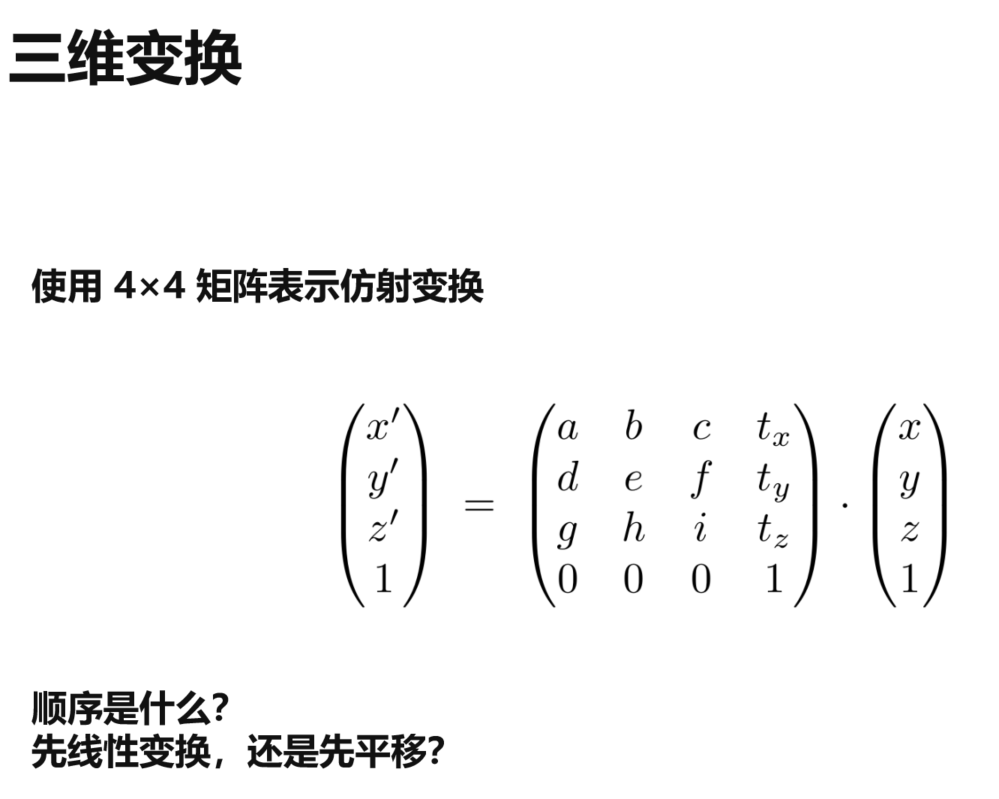
三维仿射变换使用 \(4\times4\) 矩阵:
\[
\begin{pmatrix}
x^{\prime}\\
y^{\prime}\\
z^{\prime}\\
1
\end{pmatrix} =
\begin{pmatrix}
a&b&c&t_x\\
d&e&f&t_y\\
g&h&i&t_z\\
0&0&0&1
\end{pmatrix}
\begin{pmatrix}
x\\
y\\
z\\
1
\end{pmatrix}
\]
其中:
- 左上角 \(3\times3\) 矩阵表示三维线性变换。
- 最后一列 \((t_x,t_y,t_z)^T\) 表示平移。
- 最后一行保持 \((0,0,0,1)\)。
直接展开可以看出,这种矩阵表示的是先做线性变换,再做平移。
3.7 作业 0
作业要求
给定二维点:
\[
P=(2,1)
\]
先绕原点**逆时针旋转 \(45^\circ\)**,再平移 \((1,2)\),使用齐次坐标计算最终位置。
这道题正好把前面学过的旋转、平移、齐次坐标和组合变换写一遍代码。
环境与工程
我这里使用:
- Visual Studio 2026
- CMake
- Eigen 3.4.0
Visual Studio 用来写代码、调试和运行,C++ 实际由其中的 MSVC 编译。
CMake 用来描述项目怎么构建,例如有哪些源文件、头文件去哪里找、最后生成什么程序。配置主要写在 CMakeLists.txt 中。
Eigen 是 C++ 线性代数库,后面的向量和矩阵运算都直接用它。Eigen 是 header-only 的,配置好头文件路径就可以使用。
本地 Eigen:
D:\Software\EIGEN\eigen-3.4.0
作业目录:
E:\GameDevelopment\GameDevelopmentLearning\GAMES\101\HomeWork\HomeWork0\pa0
原始工程:
pa0
├── CMakeLists.txt
├── main.cpp
└── pa0.pdf
pa0.pdf:作业说明。main.cpp:代码框架。CMakeLists.txt:CMake 构建配置。
原始 CMakeLists.txt:
cmake_minimum_required(VERSION 2.8.11)      # 要求最低 CMake 版本为 2.8.11

project(Transformation)                    # 项目名称为 Transformation

find_package(Eigen3 REQUIRED)              # 查找 Eigen3,找不到则停止配置

include_directories(EIGEN3_INCLUDE_DIR)    # 添加 Eigen 头文件搜索目录

add_executable(Transformation main.cpp)    # 使用 main.cpp 生成 Transformation 可执行程序
官方环境已经配置好了 Eigen,我这里是 Windows 本地直接下载的,所以改成:
cmake_minimum_required(VERSION 3.15)                       # 最低使用 CMake 3.15

project(Transformation LANGUAGES CXX)                     # 创建 C++ 项目 Transformation

set(CMAKE_CXX_STANDARD 17)                                # 使用 C++17

set(CMAKE_CXX_STANDARD_REQUIRED ON)                       # 必须支持指定的 C++17 标准

include_directories("D:/Software/EIGEN/eigen-3.4.0")     # 添加 Eigen 头文件搜索目录

add_executable(Transformation main.cpp)                   # 使用 main.cpp 生成可执行程序

if(MSVC)                                                  # 当前编译器是 MSVC 时
    target_compile_options(Transformation PRIVATE /utf-8) # 使用 UTF-8 读取源码
endif()
这里 Eigen 路径写到:
D:/Software/EIGEN/eigen-3.4.0
代码中就可以直接:
#include <Eigen/Core>
#include <Eigen/Dense>
配置时还碰到了 C4819,中文注释在当前代码页下无法正常处理,所以给 MSVC 加了 /utf-8。
main.cpp 里已经给了一些 Eigen 的基础示例,例如:
Eigen::Vector3f v(1.0f, 2.0f, 3.0f);
Eigen::Vector3f w(1.0f, 0.0f, 0.0f);

std::cout << v + w << std::endl;
std::cout << v * 3.0f << std::endl;

Eigen::Matrix3f matrix;
其中:
Vector3f:3 个float组成的列向量。Matrix3f:\(3\times3\) 的float矩阵。
环境跑通后开始写题。
完成变换
原始点:
\[
P=(2,1)
\]
二维点写成齐次坐标:
\[
P=
\begin{pmatrix}
2\\
1\\
1
\end{pmatrix}
\]
代码:
Eigen::Vector3f point(2.0f, 1.0f, 1.0f);
C++ 的 sin、cos 使用弧度,所以先把 \(45^\circ\) 转成弧度:
const float pi = std::acos(-1.0f);
const float angle = 45.0f / 180.0f * pi;
旋转矩阵:
\[
R=
\begin{pmatrix}
\cos\theta&-\sin\theta&0\\
\sin\theta&\cos\theta&0\\
0&0&1
\end{pmatrix}
\]
对应代码:
Eigen::Matrix3f rotationMatrix;

rotationMatrix <<
    std::cos(angle), -std::sin(angle), 0.0f,
    std::sin(angle),  std::cos(angle), 0.0f,
    0.0f,             0.0f,            1.0f;
平移 \((1,2)\):
\[
T=
\begin{pmatrix}
1&0&1\\
0&1&2\\
0&0&1
\end{pmatrix}
\]
对应:
Eigen::Matrix3f translationMatrix;

translationMatrix <<
    1.0f, 0.0f, 1.0f,
    0.0f, 1.0f, 2.0f,
    0.0f, 0.0f, 1.0f;
题目要求先旋转,再平移。
使用列向量时矩阵从右往左执行:
\[
P^{\prime}=TRP
\]
所以直接写:
Eigen::Vector3f result =
    translationMatrix * rotationMatrix * point;
核心代码
#include <Eigen/Core>
#include <Eigen/Dense>
#include <cmath>
#include <iostream>

int main()
{
    // 原始点 P = (2, 1)
    Eigen::Vector3f point(2.0f, 1.0f, 1.0f);

    // 45 度转弧度
    const float pi = std::acos(-1.0f);
    const float angle = 45.0f / 180.0f * pi;

    // 逆时针旋转矩阵
    Eigen::Matrix3f rotationMatrix;

    rotationMatrix <<
        std::cos(angle), -std::sin(angle), 0.0f,
        std::sin(angle),  std::cos(angle), 0.0f,
        0.0f,             0.0f,            1.0f;

    // 平移矩阵
    Eigen::Matrix3f translationMatrix;

    translationMatrix <<
        1.0f, 0.0f, 1.0f,
        0.0f, 1.0f, 2.0f,
        0.0f, 0.0f, 1.0f;

    // 先旋转,再平移
    Eigen::Vector3f result =
        translationMatrix * rotationMatrix * point;

    std::cout << result << std::endl;

    return 0;
}
运行结果:
1.70711
4.12132
1
最后的 1 是齐次坐标的 \(w\) 分量,所以最终二维坐标为:
\[
P^{\prime}=(1.70711,\ 4.12132)
\]
手算也可以验证。
旋转 \(45^\circ\):
\[
x^{\prime}=2\cos45^\circ-\sin45^\circ
\]
\[
y^{\prime}=2\sin45^\circ+\cos45^\circ
\]
得到:
\[
(0.7071,\ 2.1213)
\]
再平移 \((1,2)\):
\[
(0.7071+1,\ 2.1213+2)
\]
得到:
\[
(1.7071,\ 4.1213)
\]
作业 0 主要就是熟悉 Eigen 的矩阵、向量操作,并把前面的组合变换实际写出来:
\[
P^{\prime}=TRP
\]
完整代码
CMakeLists.txt
cmake_minimum_required(VERSION 3.15)                       # 最低使用 CMake 3.15

project(Transformation LANGUAGES CXX)                     # 创建 C++ 项目 Transformation

set(CMAKE_CXX_STANDARD 17)                                # 使用 C++17

set(CMAKE_CXX_STANDARD_REQUIRED ON)                       # 必须支持指定的 C++17 标准

include_directories("D:/Software/EIGEN/eigen-3.4.0")     # 添加 Eigen 头文件搜索目录

add_executable(Transformation main.cpp)                   # 使用 main.cpp 生成可执行程序

if(MSVC)                                                  # 当前编译器是 MSVC 时
    target_compile_options(Transformation PRIVATE /utf-8) # 使用 UTF-8 读取源码
endif()
main.cpp
#include <Eigen/Core>
#include <Eigen/Dense>
#include <cmath>
#include <iostream>

int main()
{
    // ============================================================
    // 一、C++ 基础示例
    // ============================================================

    std::cout << "===== C++ Basic Example =====\n"; // C++ 基础示例

    float a = 1.0f;
    float b = 2.0f;

    std::cout << a << std::endl; // 1
    std::cout << a / b << std::endl; // 0.5
    std::cout << std::sqrt(b) << std::endl; // 1.41421
    std::cout << std::acos(-1.0f) << std::endl; // 3.14159
    std::cout << std::sin(30.0f / 180.0f * std::acos(-1.0f)) << std::endl; // 0.5


    // ============================================================
    // 二、Eigen 向量示例
    // ============================================================

    std::cout << "\n===== Vector Example =====\n"; // 向量示例

    // 定义两个三维列向量
    Eigen::Vector3f vectorV(1.0f, 2.0f, 3.0f);
    Eigen::Vector3f vectorW(1.0f, 0.0f, 0.0f);

    std::cout << vectorV << std::endl; // (1, 2, 3)

    std::cout << vectorV + vectorW << std::endl; // (2, 2, 3)

    std::cout << vectorV * 3.0f << std::endl; // (3, 6, 9)

    std::cout << 2.0f * vectorV << std::endl; // (2, 4, 6)


    // ============================================================
    // 三、Eigen 矩阵示例
    // ============================================================

    std::cout << "\n===== Matrix Example =====\n"; // 矩阵示例

    // 定义两个 3x3 矩阵
    Eigen::Matrix3f matrixI;
    Eigen::Matrix3f matrixJ;

    matrixI <<
        1.0f, 2.0f, 3.0f,
        4.0f, 5.0f, 6.0f,
        7.0f, 8.0f, 9.0f;

    matrixJ <<
        2.0f, 3.0f, 1.0f,
        4.0f, 6.0f, 5.0f,
        9.0f, 7.0f, 8.0f;

    std::cout << matrixI << std::endl;

    std::cout << matrixI + matrixJ << std::endl;

    std::cout << matrixI * 2.0f << std::endl;

    std::cout << matrixI * matrixJ << std::endl;

    std::cout << matrixI * vectorV << std::endl;


    // ============================================================
    // 四、GAMES101 作业 0
    // ============================================================

    std::cout << "\n===== GAMES101 Homework 0 =====\n"; // 作业 0

    // 题目:
    // 给定二维点 P = (2, 1)
    // 先绕原点逆时针旋转 45 度
    // 再平移 (1, 2)
    // 使用齐次坐标完成变换


    // ------------------------------------------------------------
    // 1. 原始点
    // ------------------------------------------------------------

    // 二维点 P = (2, 1)
    // 齐次坐标 P = (2, 1, 1)
    Eigen::Vector3f point(2.0f, 1.0f, 1.0f);


    // ------------------------------------------------------------
    // 2. 角度转换为弧度
    // ------------------------------------------------------------

    const float pi = std::acos(-1.0f);

    const float angle =
        45.0f / 180.0f * pi;


    // ------------------------------------------------------------
    // 3. 旋转矩阵
    // ------------------------------------------------------------

    // 二维齐次旋转矩阵:
    //
    // | cos(theta)  -sin(theta)  0 |
    // | sin(theta)   cos(theta)  0 |
    // |      0            0      1 |
    //
    Eigen::Matrix3f rotationMatrix;

    rotationMatrix <<
        std::cos(angle), -std::sin(angle), 0.0f,
        std::sin(angle), std::cos(angle), 0.0f,
        0.0f, 0.0f, 1.0f;


    // ------------------------------------------------------------
    // 4. 平移矩阵
    // ------------------------------------------------------------

    // x 方向平移 1
    // y 方向平移 2
    //
    // | 1  0  1 |
    // | 0  1  2 |
    // | 0  0  1 |
    //
    Eigen::Matrix3f translationMatrix;

    translationMatrix <<
        1.0f, 0.0f, 1.0f,
        0.0f, 1.0f, 2.0f,
        0.0f, 0.0f, 1.0f;


    // ------------------------------------------------------------
    // 5. 组合矩阵
    // ------------------------------------------------------------

    // 先旋转,再平移
    //
    // P' = T * R * P
    //
    Eigen::Matrix3f transformMatrix =
        translationMatrix * rotationMatrix;


    // ------------------------------------------------------------
    // 6. 计算最终点
    // ------------------------------------------------------------

    Eigen::Vector3f result =
        transformMatrix * point;


    // ------------------------------------------------------------
    // 7. 输出
    // ------------------------------------------------------------

    std::cout << point << std::endl; // (2, 1, 1)

    std::cout << angle << std::endl; // 0.785398

    std::cout << rotationMatrix << std::endl; // R

    std::cout << translationMatrix << std::endl; // T

    std::cout << transformMatrix << std::endl; // T * R

    std::cout << result << std::endl; // (1.70711, 4.12132, 1)

    return 0;
}
3.8 总结
- 线性变换可以统一表示为矩阵乘向量,缩放、反射、剪切和旋转都属于这一类。
- 平移不是普通线性变换,齐次坐标通过增加一个维度,将平移也统一进矩阵表示。
- 仿射变换 = 线性变换 + 平移。
- 变换顺序很重要,使用列向量时矩阵从右向左执行。
- 二维仿射变换使用 \(3\times3\) 齐次矩阵,三维仿射变换使用 \(4\times4\) 齐次矩阵。
转载请注明来源,欢迎对文章中的引用来源进行考证,欢迎指出任何有错误或不够清晰的表达。可以在下面评论区评论,也可以邮件至 785293209@qq.com