13.具体实现-烘焙部分-生成配置信息
13.1 知识点
CreateVATFuc 里:声明配置并记录顶点数
//声明动画配置信息对象
AnimationInfos animationInfos = new AnimationInfos();
//记录顶点数量,通过蒙皮网格渲染器去得到
animationInfos.vertexCount = skinnedMeshRenderer.sharedMesh.vertexCount;
记录顶点最大最小值
第一遍遍历所有动画、所有帧后得到全局 min / max,写入 AnimationInfos,之后在 Shader 里把 VAT 里 0~1 的数据反映射回实际坐标。
//记录顶点最大最小值 用于之后在代码中把顶点从0~1反映射回正常的坐标
animationInfos.vertexMax = max;
animationInfos.vertexMin = min;
声明各动画条目并逐段写入纹理
在此之前已 new Texture2D、初始化 nowPiexlIndex,并完成第一遍统计全局 min/max(与文末完整代码一致)。allAnimationinfo 与状态机里动画一一对应;逐个填写状态名、总帧数、起始像素索引、帧率;内层按帧采样、BakeMesh,InverseLerp 后 SetPixel。每段结束 nowAnimationIndex += frameCount * vertexCount。
//声明记录单个动画数据的数组即可 再下方进行单个动画信息的记录
animationInfos.allAnimationinfo = new AnimationInfo[states.Length];

int nowAnimationIndex = 0;

for (int i = 0; i < states.Length; i++)
{
    //单个动画的 处理
    AnimationInfo animationInfo = new AnimationInfo();
    animationInfos.allAnimationinfo[i] = animationInfo;

    AnimatorState state = states[i].state;
    AnimationClip animClip = state.motion as AnimationClip;
    int frameCount = Mathf.CeilToInt(animClip.length * animClip.frameRate);

    //记录动画状态名字
    animationInfo.animationName = state.name;
    //记录总帧数 当前动画
    animationInfo.frameCount = frameCount;
    //当前动画起始的索引数
    animationInfo.pixelIndex = nowAnimationIndex;
    //记录帧率
    animationInfo.frameRate = (int)animClip.frameRate;

    //需要把每一帧对应的时间点传递进去 => 帧数转时间 帧数/帧率
    for (int j = 0; j < frameCount; j++)
    {
        //一帧一帧的得到对应的顶点数据 存储到VAT中
        //让对象定格到了某一帧
        animClip.SampleAnimation(targetObj, j / animClip.frameRate);
        //得到当前帧的顶点信息
        //每次烘焙时把上一次的数据清理了
        mesh.Clear(false);
        //得到了此时此刻的网格相关的数据
        skinnedMeshRenderer.BakeMesh(mesh);
        //得到了此时此刻网格对应的所有顶点位置
        Vector3[] vertices = mesh.vertices;
        Vector3[] normals = mesh.normals;
        Vector4[] tangents = mesh.tangents;

        //我们需要遍历所有动画切片的所有帧的网格顶点位置
        //从而找到最大最小值 才能进行归一化计算
        //帧数 * 顶点数
        //(57+50+20)* 9500
        for (int k = 0; k < vertices.Length; k++)
        {
            Vector3 nowVertice = vertices[k];
            Vector3 normalVertice = new Vector3(Mathf.InverseLerp(min, max, nowVertice.x),
                Mathf.InverseLerp(min, max, nowVertice.y),
                Mathf.InverseLerp(min, max, nowVertice.z));

            //通过索引得到 x y 坐标
            int x = nowPiexlIndex % 2048;
            int y = nowPiexlIndex / 2048;
            tex.SetPixel(x, y, new Color(normalVertice.x, normalVertice.y, normalVertice.z, 1));
            ++nowPiexlIndex;
        }
    }

    //每一个动画 它的起始索引的变化规则
    //当前动画总帧数 * 顶点数
    nowAnimationIndex += frameCount * animationInfos.vertexCount;
}
保存 SO
//...
//对生成的VAT进行关联
animationInfos.vat_texture = AssetDatabase.LoadAssetAtPath<Texture2D>(SETTING_PATH + targetObj.name + ".png");

//存储配置文件到本地
string vatInfoPath = SETTING_PATH + targetObj.name + "_animationInfos.asset";
AssetDatabase.CreateAsset(animationInfos, vatInfoPath);
AssetDatabase.Refresh();
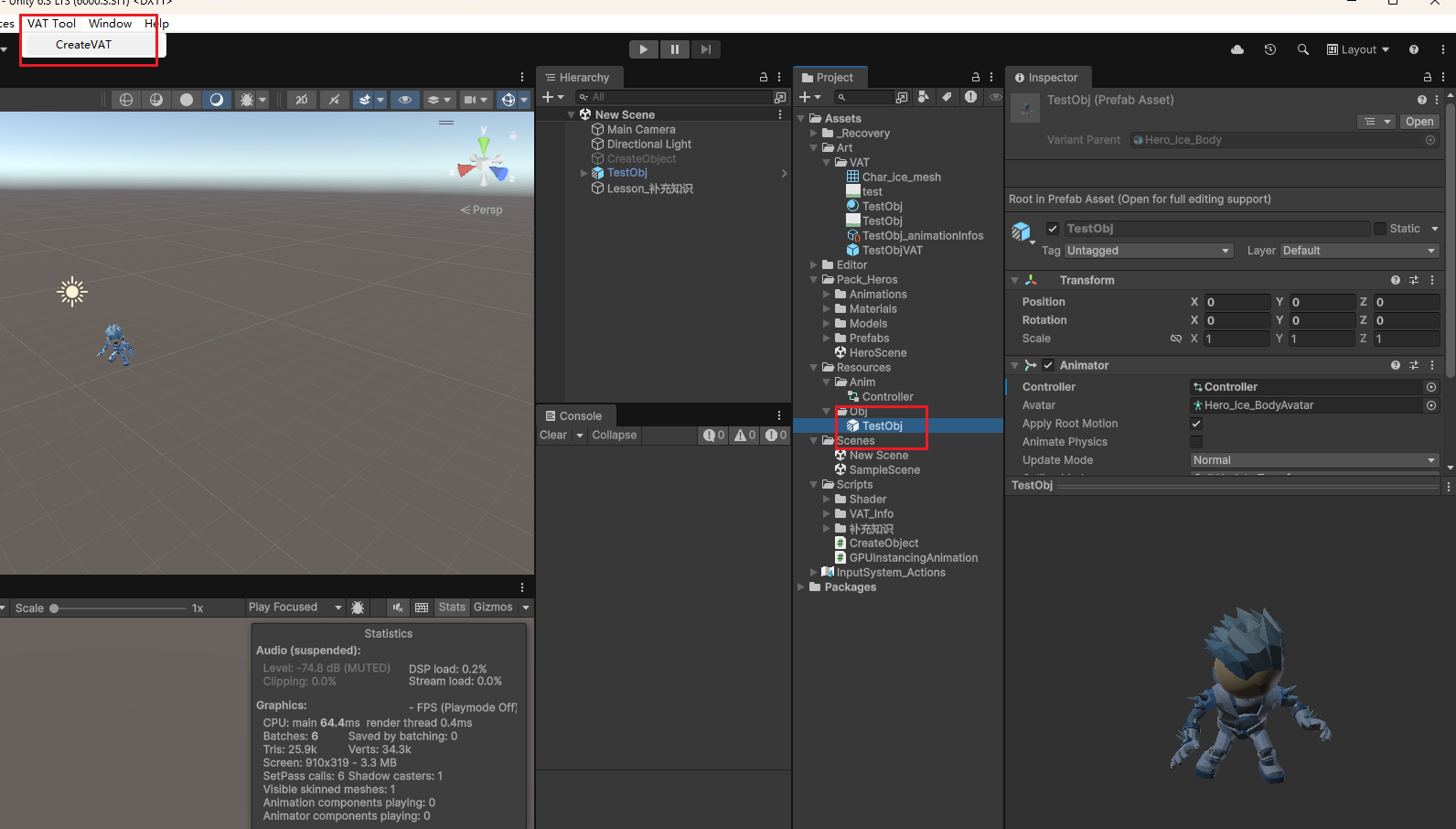
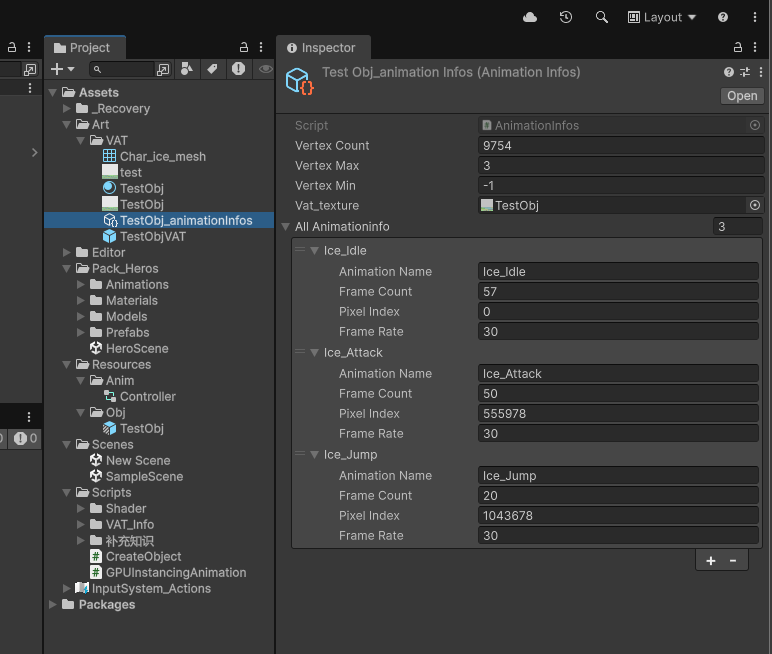
编辑器里试一下
选中 TestObj(或你的目标),菜单 VAT Tool → CreateVAT,生成后可用 SO 与 VAT 做后续逻辑。
13.2 知识点代码
CreateVAT.cs
using System.IO;
using UnityEditor;
using UnityEditor.Animations;
using UnityEngine;

public class CreateVAT
{
    //默认存储路径 方便之后修改路径 进行修改 因此我们把它写在前面
    private static string SAVA_VAT_PATH = Application.dataPath + "/Art/VAT/";
    private static string SETTING_PATH = "Assets/Art/VAT/";

    [MenuItem("VAT Tool/CreateVAT")]
    public static void CreateVertexAnimationTexture()
    {
        //获取当前在编辑器中选择的对象 来进行生成
        GameObject selObj = Selection.activeObject as GameObject;
        CreateVATFuc(selObj);
    }

    private static void CreateVATFuc(GameObject targetObj)
    {
        if (targetObj == null)
        {
            Debug.LogError("你应该选择一个想要生成VAT的目标对象");
            return;
        }

        //主要步骤:
        //1.得到目标GameObject
        //2.得到GameObject上的Animator组件
        Animator animator = targetObj.GetComponent<Animator>();
        if (animator == null)
        {
            Debug.LogError("它需要挂载Animator组件去关联对应动画");
            return;
        }

        //3.通过Animator组件得到AnimatorController
        AnimatorController animatorController = animator.runtimeAnimatorController as AnimatorController;
        //4.得到AnimatorController中对应层的状态机AnimatorStateMachine
        AnimatorStateMachine stateMachine = animatorController.layers[0].stateMachine;
        //5.得到状态机中的所有状态ChildAnimatorState[]数组
        ChildAnimatorState[] states = stateMachine.states;
        //6.遍历该数组
        //  其中每个状态的motion就是对应的动画切片AnimationClip
        //  这样我们就能得到


        SkinnedMeshRenderer skinnedMeshRenderer = targetObj.GetComponentInChildren<SkinnedMeshRenderer>();
        if (skinnedMeshRenderer == null)
        {
            Debug.LogError("该对象或其子对象上没有找到蒙皮网格渲染器信息");
            return;
        }

        Mesh mesh = new Mesh();


        //声明动画配置信息对象
        AnimationInfos animationInfos = new AnimationInfos();
        //记录顶点数量,通过蒙皮网格渲染器去得到
        animationInfos.vertexCount = skinnedMeshRenderer.sharedMesh.vertexCount;


        //用于存储顶点最大最小值的变量
        int min = int.MaxValue;
        int max = int.MinValue;


        for (int i = 0; i < states.Length; i++)
        {
            AnimatorState animatorState = states[i].state;
            AnimationClip animationClip = animatorState.motion as AnimationClip;
            int frameCount = Mathf.CeilToInt(animationClip.length * animationClip.frameRate);


            //需要把每一帧对应的时间点传递进去 => 帧数转时间 帧数/帧率
            for (int j = 0; j < frameCount; j++)
            {
                //一帧一帧的得到对应的顶点数据 存储到VAT中
                //让对象定格到了某一帧
                animationClip.SampleAnimation(targetObj, j / animationClip.frameRate);
                //得到当前帧的顶点信息
                //每次烘焙时把上一次的数据清理了
                mesh.Clear(false);
                //得到了此时此刻的网格相关的数据
                skinnedMeshRenderer.BakeMesh(mesh);
                //得到了此时此刻网格对应的所有顶点位置
                Vector3[] vertices = mesh.vertices;
                Vector3[] normals = mesh.normals;
                Vector4[] tangents = mesh.tangents;


                //我们需要遍历所有动画切片的所有帧的网格顶点位置
                //从而找到最大最小值 才能进行归一化计算
                //帧数 * 顶点数
                //(57+50+20)* 9500
                for (int k = 0; k < vertices.Length; k++)
                {
                    Vector3 nowVertice = vertices[k];
                    min = Mathf.FloorToInt(Mathf.Min(min, nowVertice.x, nowVertice.y, nowVertice.z));
                    max = Mathf.CeilToInt(Mathf.Max(max, nowVertice.x, nowVertice.y, nowVertice.z));
                }
            }
        }


        Debug.Log("顶点坐标最小值" + min);
        Debug.Log("顶点坐标最大值" + max);

        //记录顶点最大最小值 用于之后在代码中把顶点从0~1反映射回正常的坐标
        animationInfos.vertexMax = max;
        animationInfos.vertexMin = min;


        Texture2D tex = new Texture2D(2048, 2048, TextureFormat.RGBA32, false, true);
        //当前像素索引
        int nowPiexlIndex = 0;

        //声明记录单个动画数据的数组即可 再下方进行单个动画信息的记录
        animationInfos.allAnimationinfo = new AnimationInfo[states.Length];

        int nowAnimationIndex = 0;


        for (int i = 0; i < states.Length; i++)
        {
            //单个动画的 处理
            AnimationInfo animationInfo = new AnimationInfo();
            animationInfos.allAnimationinfo[i] = animationInfo;

            AnimatorState state = states[i].state;
            AnimationClip animClip = state.motion as AnimationClip;
            int frameCount = Mathf.CeilToInt(animClip.length * animClip.frameRate);

            //记录动画状态名字
            animationInfo.animationName = state.name;
            //记录总帧数 当前动画
            animationInfo.frameCount = frameCount;
            //当前动画起始的索引数
            animationInfo.pixelIndex = nowAnimationIndex;
            //记录帧率
            animationInfo.frameRate = (int)animClip.frameRate;


            //需要把每一帧对应的时间点传递进去 => 帧数转时间 帧数/帧率
            for (int j = 0; j < frameCount; j++)
            {
                //一帧一帧的得到对应的顶点数据 存储到VAT中
                //让对象定格到了某一帧
                animClip.SampleAnimation(targetObj, j / animClip.frameRate);
                //得到当前帧的顶点信息
                //每次烘焙时把上一次的数据清理了
                mesh.Clear(false);
                //得到了此时此刻的网格相关的数据
                skinnedMeshRenderer.BakeMesh(mesh);
                //得到了此时此刻网格对应的所有顶点位置
                Vector3[] vertices = mesh.vertices;
                Vector3[] normals = mesh.normals;
                Vector4[] tangents = mesh.tangents;


                //我们需要遍历所有动画切片的所有帧的网格顶点位置
                //从而找到最大最小值 才能进行归一化计算
                //帧数 * 顶点数
                //(57+50+20)* 9500
                for (int k = 0; k < vertices.Length; k++)
                {
                    Vector3 nowVertice = vertices[k];
                    Vector3 normalVertice = new Vector3(Mathf.InverseLerp(min, max, nowVertice.x),
                        Mathf.InverseLerp(min, max, nowVertice.y),
                        Mathf.InverseLerp(min, max, nowVertice.z));


                    //通过索引得到 x y 坐标
                    int x = nowPiexlIndex % 2048;
                    int y = nowPiexlIndex / 2048;
                    tex.SetPixel(x, y, new Color(normalVertice.x, normalVertice.y, normalVertice.z, 1));
                    ++nowPiexlIndex;
                }
            }


            //每一个动画 它的起始索引的变化规则
            //当前动画总帧数 * 顶点数
            nowAnimationIndex += frameCount * animationInfos.vertexCount;
        }


        //循环结束后 像素存储完毕了
        tex.Apply(false, false);
        File.WriteAllBytes(SAVA_VAT_PATH + targetObj.name + ".png", tex.EncodeToPNG());
        AssetDatabase.Refresh();

        //纹理生成完毕了 对它进行一劳永逸的基础设置
        TextureImporter textureImporter =
            AssetImporter.GetAtPath(SETTING_PATH + targetObj.name + ".png") as TextureImporter;
        textureImporter.textureCompression = TextureImporterCompression.Uncompressed;
        textureImporter.filterMode = FilterMode.Point;
        textureImporter.mipmapEnabled = false;
        textureImporter.sRGBTexture = false;
        textureImporter.SaveAndReimport();

        //对生成的VAT进行关联
        animationInfos.vat_texture = AssetDatabase.LoadAssetAtPath<Texture2D>(SETTING_PATH + targetObj.name + ".png");

        //存储配置文件到本地
        string vatInfoPath = SETTING_PATH + targetObj.name + "_animationInfos.asset";
        AssetDatabase.CreateAsset(animationInfos, vatInfoPath);
        AssetDatabase.Refresh();


        //之所以绕一圈去获取动画切片 是为了之后做铺垫
        //我们可以结合Animator,蒙皮网格渲染器,利用他们一起去得到某一个动画某一帧对应的顶点数据
    }
}
转载请注明来源,欢迎对文章中的引用来源进行考证,欢迎指出任何有错误或不够清晰的表达。可以在下面评论区评论,也可以邮件至 785293209@qq.com